
Notice of assessment: reading your CRA NOA section by section
Short answer
A notice of assessment (NOA) is the CRA's summary of how it assessed your income tax and benefit return. It shows whether you get a refund, owe an amount or have a nil balance, lists the key line amounts the CRA accepted, explains any changes, and gives your RRSP deduction limit and FHSA room for next year. It is not a copy of your return.
- 01What it is
- The CRA's official result for your T1 return
- 02Three possible results
- Refund, Amount due, or Balance: Nil
- 03Where to see it (from February 2026)
- Digital notices only in your CRA account
- 04NETFILE access code
- 8 characters, letters and numbers, on the right side
- 05Time to formally dispute it
- 90 days from the notice date, or 1 year after the filing deadline if later
- 06How long to keep it
- At least 6 years from the end of the tax year
What is a notice of assessment?
A notice of assessment is the document the CRA issues after it has checked your return and calculated your tax. In plain terms, it is the CRA saying: this is the income, deductions and credits we accepted, and this is the result. The notice of assessment meaning is the same across Canada, whether you filed online or on paper.
It is not the same as your return. Your return is what you claimed; the NOA is what the CRA allowed. Most of the time the two match. When they do not, the NOA is the version that counts for your refund, your balance owing and your RRSP room.
Each tax year gets its own NOA. If you file several years at once, the CRA may do a concurrent assessment and show the combined result in the account summary on the last notice of the series. For timing, see the CRA tax return timeline.
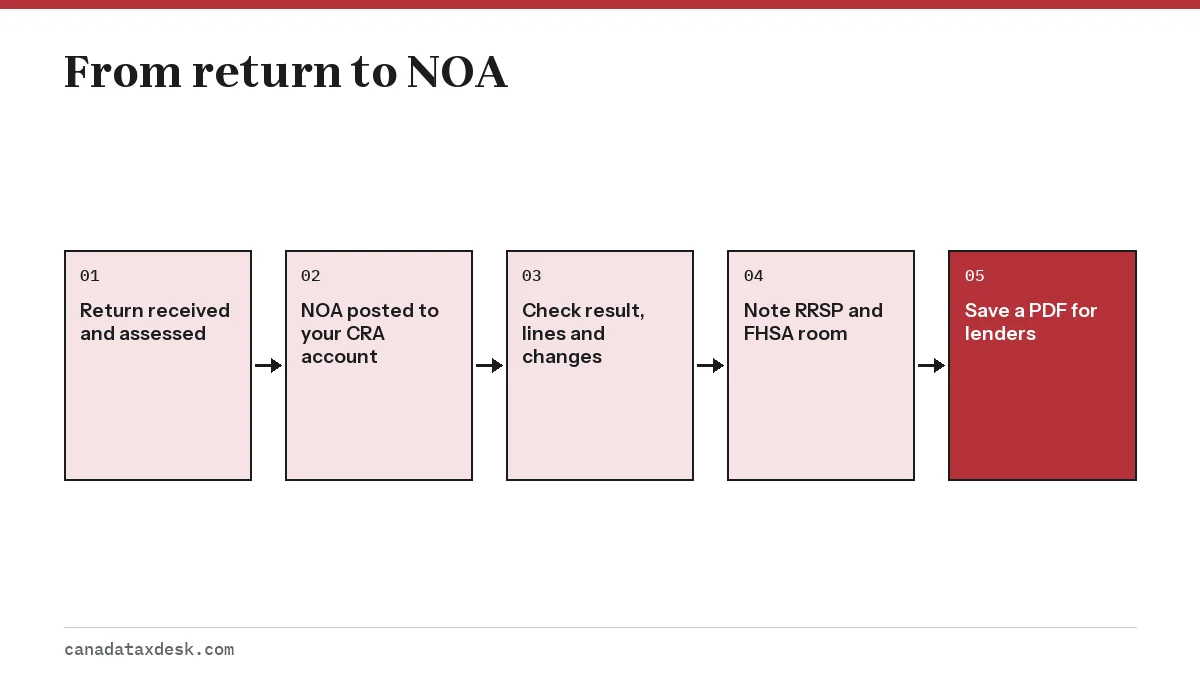
How to read your notice of assessment from the CRA, section by section
Every NOA follows the same layout. Work through it from the top.
1. Name, address and tax centre
The top shows the name and mailing address the CRA has on file and the tax centre that processed the return. If the address is out of date, change it in your CRA account before any cheque is mailed.
2. Notice details
This box gives the last four digits of your social insurance number (or temporary taxation number), the tax year assessed, and the date the notice was issued. That date matters: your 90-day window to object starts from it.
3. NETFILE access code
On the right side sits an 8-character code made of letters and numbers. You can enter it in tax software next year to confirm your identity when you file. It is optional, but without it the CRA has to authenticate you with other information. Our NETFILE access code page explains when it changes and where else to find it. Since February 2026 the CRA has also made the code easier to find in your CRA account.
4. Account summary
This is the headline result, and it takes one of three forms. Refund: with an amount means the CRA owes you. Amount due: means you owe the CRA. Balance: Nil means neither side owes anything for that year.
5. Tax assessment summary
This part lists the key line numbers and amounts used in the calculation, such as total income (line 15000), net income (line 23600), taxable income (line 26000), total credits, tax deducted at source and the resulting refund or balance. If you get a refund, it says Direct deposit when you are enrolled, or Refund when a cheque will be mailed separately.
6. Explanation of changes and other important information
If the CRA changed anything, this section says what and why, for example a disallowed claim, a missing slip it added, or a credit it recalculated. When this section is blank or only has general messages, your return was accepted as filed.
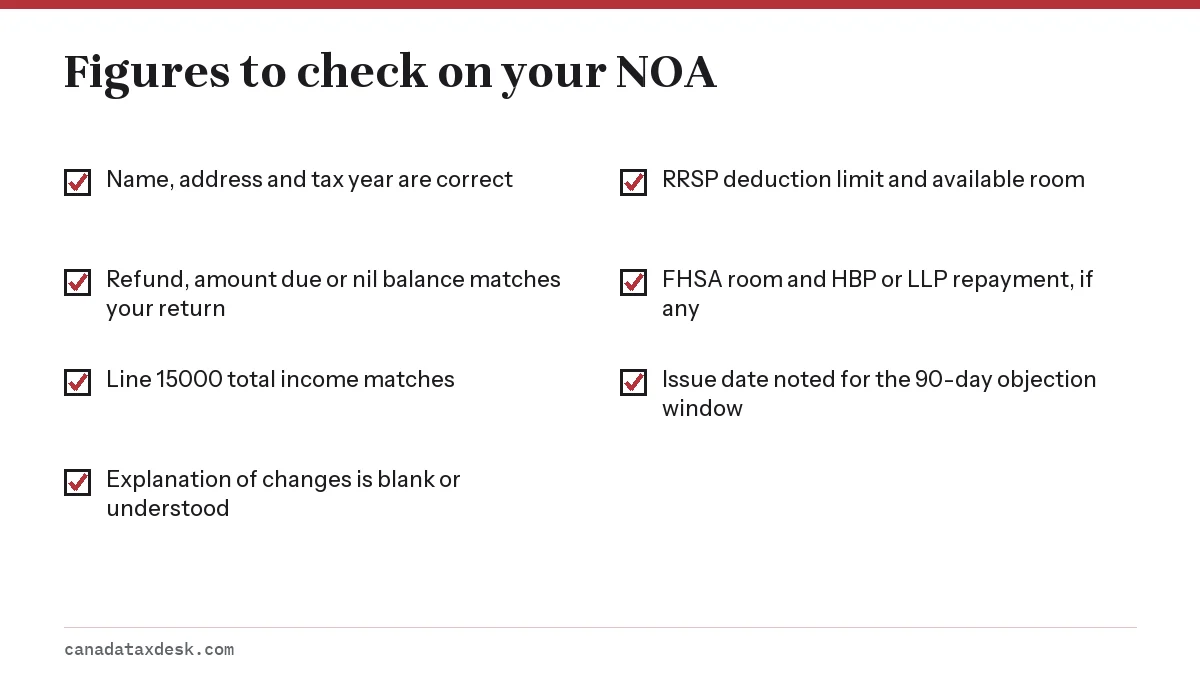
RRSP limit, FHSA room and repayment plans on your NOA
Depending on your situation, the last pages carry statements for registered plans. These are the figures people most often come back to during the year.
| Statement | What it tells you | Who sees it |
|---|---|---|
| RRSP deduction limit statement | Your deduction limit and available contribution room for next year, plus any unused contributions | Anyone with earned income or RRSP activity |
| Home Buyers' Plan statement | Balance left to repay and the minimum repayment for next year | People who withdrew under the HBP |
| Lifelong Learning Plan statement | Balance left to repay and the minimum repayment | People who withdrew under the LLP |
| FHSA participation room statement | Room for next year and unused contributions you can still deduct | People who opened a first home savings account |
The RRSP figure is the lesser of 18% of your previous year's earned income and the annual dollar limit, plus unused room, minus any pension adjustment. The dollar limit is $33,810 for 2026 and $35,390 for 2027. For how the calculation works, see our RRSP contribution limit page.
Where is TFSA room?
Your TFSA contribution room is not printed on the NOA. The CRA shows it in your CRA account under the TFSA section. Keep in mind that the account figure only reflects transactions your financial institutions have reported, so contributions made this year may not appear yet.
When the NOA differs from your tax return
A gap between your tax return and your notice of assessment has a reason, and it is usually in the explanation of changes. Here is a worked example of how to trace one.
Say your 2026 return showed a refund of $840, but the NOA shows Refund: $543. The explanation section says the CRA added a T5 slip for $1,000 of bank interest you missed. If your taxable income sits in the 20.5% federal bracket and Ontario's 9.15% bracket, that extra $1,000 adds about $297 of tax ($205 federal plus $91.50 Ontario, rounded), which accounts for the gap. Check the slip in your account before you accept or dispute the change.
- Compare line 15000 on the NOA with line 15000 on your return. A difference points to income the CRA added or removed.
- Compare the refund or balance, then read the explanation section line by line.
- Look in your CRA account under Tax slips to see what employers and banks reported for you.
- If you left something out, request a change after the NOA using Change my return, ReFILE or Form T1-ADJ.
- If your information was complete and you think the CRA is wrong, file an objection within the deadline.
Once a change is processed, the CRA sends a notice of reassessment with updated figures, and that document replaces the original result.
Why you need your notice of assessment
Banks, governments and other institutions often ask for proof of income when you apply for a mortgage, a loan, a subsidy or a benefit, and the NOA is the most common document they accept. It carries more weight than a copy of your return because it shows what the CRA actually assessed.
- Mortgage and loan applications, usually for the last two years.
- Student aid, subsidized housing and some provincial programs.
- Next year's filing, for the NETFILE access code.
- Planning RRSP, HBP and FHSA contributions.
- Checking whether a later reassessment changed anything.
Some institutions will take a proof of income statement instead. It is a simpler summary of your income and deductions for one year, and you can get it right away in your CRA account under the Tax returns tab. To find or print the full NOA, see where is my notice of assessment.
How long to keep your NOA
The CRA's general rule is to keep records and supporting documents for six years from the end of the tax year they relate to. For individuals, the tax year is the calendar year, so the NOA and receipts for your 2025 return should be kept until at least the end of 2031.
If you filed a return late, the six years run from the date you filed it. If you objected or appealed, keep everything until the dispute is resolved and any further appeal period has passed, even if that goes beyond six years.
Because digital notices now stay in your CRA account, older NOAs are easy to reprint. Still, save a PDF copy each year: if you ever lose access to your account, a saved file is faster than recovering the account.
Common questions
Is a notice of assessment the same as a tax return or T1 General?
No. The T1 General is the return form you or your software filed, showing what you reported; the notice of assessment is the CRA's result after checking it. If the CRA changed anything, the NOA figures are the ones that apply.
What does Balance: Nil mean on my notice of assessment?
It means the CRA calculated that you neither get a refund nor owe anything for that tax year. Your deductions at source exactly covered your tax.
What is line 26000 on my notice of assessment?
Line 26000 is your taxable income: your net income from line 23600 minus the few deductions allowed after net income, such as losses carried over from other years or the northern residents deduction. Federal and provincial tax rates are applied to this amount, so it is the figure to compare with the tax brackets.
Does my notice of assessment show my TFSA room?
No. The NOA shows RRSP, HBP, LLP and FHSA statements. TFSA room is shown in the TFSA section of your CRA account.
Why does my notice of assessment say amount due when I paid?
If the notice was issued before your payment was processed, it can still show a balance owing. Check your account balance in your CRA account a few days after paying.
Can I use my notice of assessment for a mortgage?
Yes, lenders commonly ask for the NOA as proof of income, often for two years. Some also accept the proof of income statement from your CRA account.
How long do I have to dispute a notice of assessment?
For individuals, the later of 90 days from the date on the notice or one year after the filing deadline for that return. If the problem is information you left out, a change request is usually quicker than an objection.
How do I get a copy of my notice of assessment?
Sign in to your CRA account, open your individual account and go to Tax returns or Mail to view and print the PDF. If you want the CRA to mail you a paper copy, you have to call 1-800-959-8281 to ask for it.
Sources
- CRA: Notices of assessment - NOA or NOR canada.ca
- CRA: Proof of income statement canada.ca
- CRA: Where to keep your records and how long canada.ca
- CRA: MP, DB, RRSP, DPSP, ALDA, TFSA limits and YMPE canada.ca
- CRA: What you need for the 2026 tax filing season canada.ca
We check figures against these official pages. Rules change; confirm anything that affects a deadline or payment with the agency before you act.
Tell us what happened
Describe your situation and our editors will use it to improve this guide. If you leave your email, we may reply with a pointer to the right page or official contact. We never share your details.
Related guides
 After You File Your Tax Return: CRA Timeline Explained
The CRA tax return timeline starts the moment your return is received. For a return filed online, the CRA's service standard is a…
Where Is My Notice of Assessment? Get a Copy Online
Your notice of assessment is in your CRA account, where you can view, download or print a copy at any time. Sign in, open your in…
Notice of Reassessment: Why the CRA Changed Your Return
A notice of reassessment (NOR) is the updated result the CRA sends when it changes a return it has already assessed. It follows a…
NETFILE Access Code: Where to Find It on Your NOA in 2027
The NETFILE access code is an 8-character code of letters and numbers printed on the right side of your most recent notice of ass…
RRSP Contribution Limit 2026: How Your Room Is Calculated
The RRSP contribution limit for 2026 is 18% of your 2025 earned income, to a maximum of $33,810, plus any unused room from earlie…
After You File Your Tax Return: CRA Timeline Explained
The CRA tax return timeline starts the moment your return is received. For a return filed online, the CRA's service standard is a…
Where Is My Notice of Assessment? Get a Copy Online
Your notice of assessment is in your CRA account, where you can view, download or print a copy at any time. Sign in, open your in…
Notice of Reassessment: Why the CRA Changed Your Return
A notice of reassessment (NOR) is the updated result the CRA sends when it changes a return it has already assessed. It follows a…
NETFILE Access Code: Where to Find It on Your NOA in 2027
The NETFILE access code is an 8-character code of letters and numbers printed on the right side of your most recent notice of ass…
RRSP Contribution Limit 2026: How Your Room Is Calculated
The RRSP contribution limit for 2026 is 18% of your 2025 earned income, to a maximum of $33,810, plus any unused room from earlie…