
Topic
NETFILE Canada: how to file your tax return online
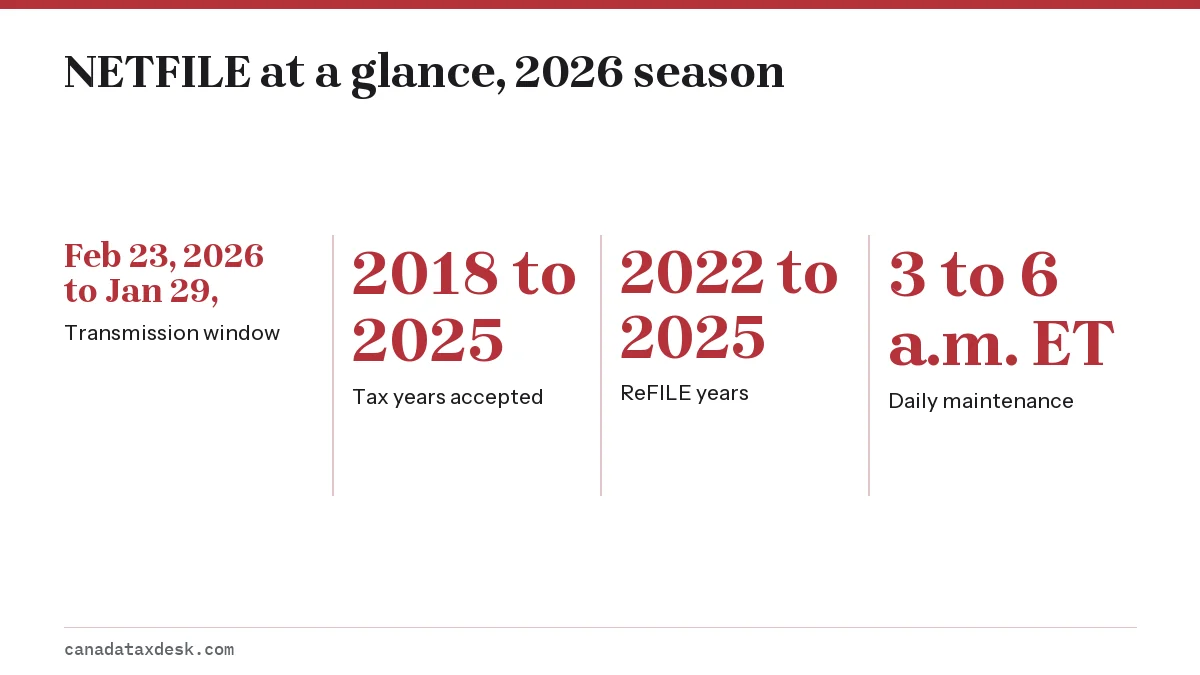
NETFILE Canada is the CRA service that receives a personal T1 return sent straight from certified tax software. For the current season it is open from February 23, 2026 at 6:00 a.m. Eastern time to January 29, 2027, and accepts returns for tax years 2018 to 2025. You get a confirmation code in the software, and online filers usually get a notice of assessment within 2 weeks.
8 guides in this topic Updated October 22, 2026
- CRA EFILE: Registration, Login and 2027 RenewalCRA EFILE is the electronic filing service for people and firms who prepare tax returns for others. Preparers apply online, pass a suitability screen…
- NETFILE Access Code: Where to Find It on Your NOA in 2027The NETFILE access code is an 8-character code of letters and numbers printed on the right side of your most recent notice of assessment. You can als…
- NETFILE Eligibility: Who Can and Cannot File OnlineNETFILE eligibility depends on three things: the tax year, the type of return and what is on it. In the 2026 season NETFILE accepts original returns…
- NETFILE Not Working? CRA-Side Causes and What to DoWhen NETFILE is not working, the cause is usually on a short list: the service is in its 3 a.m. to 6 a.m. ET daily maintenance, the season is closed,…
- NETFILE Quebec: Filing Your Quebec and Federal ReturnsNETFILE Quebec is really two transmissions. A Quebec resident sends a federal T1 to the CRA through NETFILE and a separate provincial TP-1 to Revenu…
- NETFILE Rejected: Why the CRA Refused Your Tax ReturnA NETFILE rejected message means the CRA received your data but refused it, so the return is not filed. Usual causes are a name or date of birth that…
- ReFILE CRA: How to Amend Your Return with Tax SoftwareReFILE is the CRA service that lets you send changes to an already assessed T1 return straight from certified tax software. In the 2026 season it cov…
- When Does NETFILE Open? 2027 Tax Season Start DateThe 2027 tax season start date, the day NETFILE opens for 2026 returns, had not been announced by the CRA as of October 22, 2026; recent seasons open…

What NETFILE Canada is and who runs it
NETFILE Canada is the Canada Revenue Agency's electronic channel for individuals who prepare their own income tax and benefit return. You do not fill in a form on a CRA web page. Instead, you complete the return in tax software that the CRA has certified, and the software transmits the finished return over the internet.
The software companies are private businesses. The CRA certifies their products for NETFILE, but it states that these companies are not CRA representatives. This site is also independent: we explain how the service works and point to canada.ca for the official pages.
Tax professionals who file for paying clients use a separate channel. If you are comparing the two, see our page on the CRA EFILE service, which covers registration and the yearly renewal preparers go through.
Is NETFILE free?
Any cost comes from the software you pick, not from the NETFILE service. The CRA's list of certified products marks some as free for everyone, and notes that others may offer a free option only if you have a modest income, a simple tax situation or live in certain provinces or territories. Compare the conditions before you start.
Read the video transcript
NETFILE, explained
NETFILE is the CRA service that receives a personal T1 return straight from certified tax software.
The current season runs from February 23, 2026 to January 29, 2027.
It accepts tax years 2018 through 2025, and amended returns through ReFILE for 2022 to 2025.
NETFILE goes down for maintenance daily, from 3 a.m. to 6 a.m. Eastern time.
Most online returns are assessed in about two weeks.
The CRA has not yet announced the 2027 opening date. It is usually published in the fall.
Who can use CRA NETFILE this season?
Most residents with a straightforward return can use CRA NETFILE. You need a social insurance number that starts with a digit from 1 to 9, or a temporary tax number that starts with 01 or 03. A SIN starting with 0 works only if you are a newcomer to Canada. The return must be for a tax year the service currently accepts.
| Item | Current rule | 2027 season |
|---|---|---|
| Original returns | Tax years 2018 to 2025 | Expected 2019 to 2026; not yet announced |
| Amended returns through ReFILE | Tax years 2022 to 2025 | Not yet announced |
| Returns per computer or CRA account (Represent a Client registrants) | Up to 20 for each tax year | Not yet announced |
| Service hours | Open all day except 3 a.m. to 6 a.m. ET | Not yet announced |
Some returns cannot go through NETFILE at all. The main exclusions are a return for a person who has died, a bankruptcy return, a year outside the accepted range, and a deemed resident. Narrower cases include foreign tax credits for more than 3 countries, more than 12 sets of financial statements, SR&ED expense claims and claims involving more than 22 children. Our NETFILE eligibility rules page lists every exclusion with what to do instead.
What you need before you file
Gathering everything first saves most of the trouble people run into on transmission day. The software checks your name, date of birth and SIN against CRA records, so small typing differences are a common reason a send fails.
- Your SIN (or temporary tax number), legal name and date of birth exactly as the CRA has them
- Your current mailing address, including postal code
- All slips for the year: T4, T4A, T5, T4E, T5007, T2202 and RRSP contribution receipts
- Receipts for credits and deductions you plan to claim, kept on file in case the CRA asks later
- Your NETFILE access code from your latest notice of assessment (optional)
- Your CRA account sign-in, if you want to use Auto-fill my return
The access code
The access code is an 8-character mix of letters and numbers printed on the right side of your most recent notice of assessment, and shown under Tax returns in My Account. Entering it is not mandatory. If you skip it, the CRA confirms your identity with other information instead. The NETFILE access code page shows where to look and what first-time filers do.
NETFILE login: do you need a CRA account?
There is no separate NETFILE login. The sign-in you create belongs to your tax software, not to the CRA. A CRA account is only needed if you want Auto-fill my return, which pulls most slips the CRA has on file into your software, or if you want to read your digital notice of assessment. From February 2027 there is also an optional extra step: you can sign in to your CRA account before you send a 2026 return so the CRA can verify who is filing.
How to file a NETFILE Canada tax return step by step
The process is the same whether you owe tax, expect a refund or have no income at all. Filing a return even with zero income is how the CRA assesses eligibility for benefits and credits.
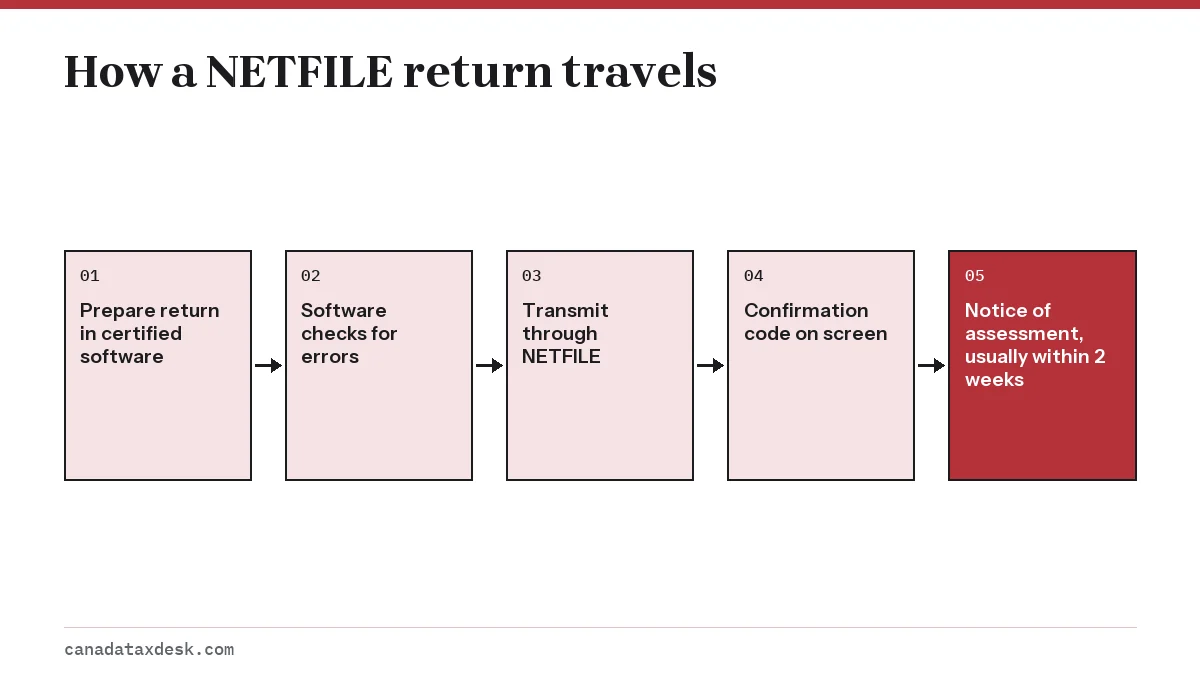
- Choose a certified product that covers your situation and the tax year you are filing.
- Enter your personal details, then decide whether to use Auto-fill my return. If you do, the software asks you to sign in to your CRA account.
- Enter every slip and any income without a slip, such as self-employment income on Form T2125.
- Claim your deductions and credits, and enter your access code if you have one.
- Review the return, fix anything the software flags, and send it.
- Save or print the confirmation message. It includes a code proving the CRA received your return.
- Watch for your notice of assessment. For online returns it usually arrives within 2 weeks.
Keep your receipts and slips for at least as long as the CRA can review the year. NETFILE does not ask you to upload paper, but the CRA may later ask you to send proof of a claim.
When NETFILE opens and closes
The service runs for most of the year and then shuts for several weeks each winter while the CRA loads the next year's rules. For 2026 it closed on February 1 and reopened on Monday, February 23 at 6:00 a.m. Eastern time. The current window ends on Friday, January 29, 2027.
The CRA has not yet announced when NETFILE opens for 2026 returns. The dates will appear on the CRA's NETFILE pages once they are set; in recent years the service has reopened in the last full week of February. We track the announcement on our NETFILE open date page, along with the April 30, 2027 filing deadline for most people and June 15, 2027 for the self-employed.
What is changing for NETFILE in late 2026 and 2027?
- Optional CRA account sign-in: before you send a 2026 return, you can choose to sign in to your CRA account, an extra identity check the CRA marks as new for February 2027. It is not mandatory; without it the CRA uses other information to confirm who you are.
- Opening date: not yet announced for 2026 returns. The current season closes Friday, January 29, 2027.
- Tax years: expected to move forward to 2019 to 2026 for original returns, but not confirmed.
- Deadline: 2026 returns are due April 30, 2027, or June 15, 2027 for the self-employed, with any balance still due April 30.
Our NETFILE open date page tracks the 2027 announcement, and the NETFILE access code page explains how the new sign-in step sits alongside the access code.
If NETFILE refuses or will not send your return
Two different things can go wrong. Sometimes the connection fails because the service is down for maintenance, the season has not opened, or your return type is not allowed. Our NETFILE not working page walks through those checks in order.
Other times the CRA receives the data and refuses it, usually because your name, date of birth or address does not match its records. A refused return has not been filed. The NETFILE rejected page explains the common reasons and how to correct and resend.
Fixing a return that was already accepted
Do not send a second original return to correct a mistake. Once you have your notice of assessment, change the return through ReFILE in your software, through Change my return in My Account, or on Form T1-ADJ. ReFILE currently covers tax years 2022 to 2025.
Common questions
What is NETFILE in Canada?
NETFILE is the CRA service that accepts personal income tax returns sent electronically from certified tax software. You prepare the return in the software, and the software transmits it. The CRA replies with a confirmation code and later a notice of assessment.
Is NETFILE free to use?
Your cost depends on the software, not on the NETFILE service. Some certified products are free for everyone, and others are free only if you meet conditions such as income limits.
Do I need a CRA account to use NETFILE?
No. You can send a return without a CRA account. You need one only for Auto-fill my return, to view your digital notice of assessment, which from February 2026 is shown only in My Account, and, if you choose, for the optional sign-in step the CRA is adding for 2026 returns in February 2027.
Which tax years can I NETFILE right now?
Until January 29, 2027, NETFILE accepts original returns for tax years 2018 to 2025. The range for the 2027 season is expected to move forward one year, but the CRA has not announced it yet.
How many returns can I NETFILE from one computer?
If you are registered for Represent a Client to act for other people, the CRA allows up to 20 returns per computer or CRA account for each tax year. Anyone preparing returns for paying clients needs the EFILE service instead.
How do I know my NETFILE return went through?
Your software shows a confirmation message with a code once the CRA has received the return. Save it. If you never saw a code, assume the return was not received and try again or check with the software.
Sources
- NETFILE: sending your return (Canada.ca)
- NETFILE eligibility and service dates (Canada.ca)
- Completing a tax return with software (Canada.ca)
- Sending a tax return (Canada.ca)
- Certified tax software (Canada.ca)
- What you need to know for the 2026 tax-filing season (Canada.ca)
- Canada Carbon Rebate for individuals: proposed October 30, 2026 deadline (Canada.ca)