
ReFILE CRA: amend an assessed return from your tax software
Short answer
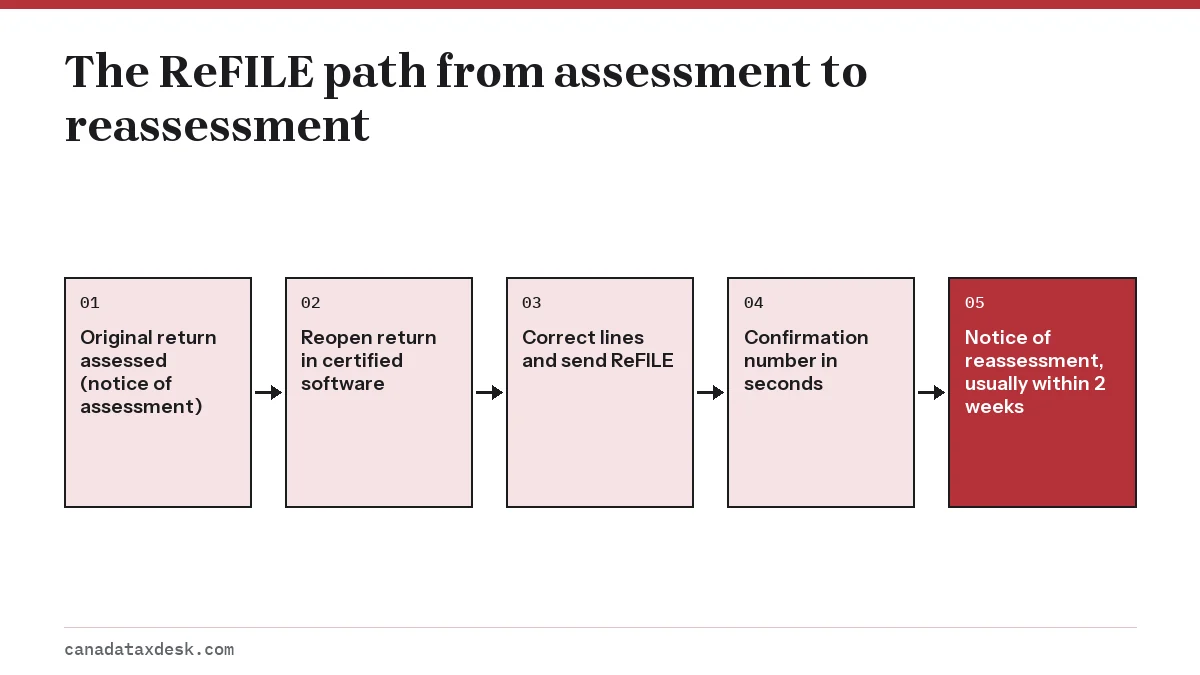
ReFILE is the CRA service that lets you send changes to an already assessed T1 return straight from certified tax software. In the 2026 season it covers tax years 2022 to 2025. You must wait for your notice of assessment first, and the CRA aims to process online change requests within 2 weeks, after which it issues a notice of reassessment.
- 01Years you can ReFILE (2026 season)
- 2022, 2023, 2024 and 2025
- 02Service window
- February 23, 2026 to January 29, 2027
- 03Online processing standard
- Within 2 weeks
- 042027 season ReFILE years
- Not yet announced
- 05Before you ReFILE
- Wait for your notice of assessment
What ReFILE CRA service does
ReFILE is the CRA's electronic channel for amending a personal T1 return through the same certified software you used to file it. You open the saved return, correct the lines that were wrong, and the software transmits only the changes. The CRA then reassesses the return and sends a notice of reassessment.
ReFILE is one of three ways to change a return. The others are Change my return inside your CRA account and a paper or webform Form T1-ADJ. All three end in the same place, a reassessment, but they differ in which years and situations they accept. ReFILE sits inside the NETFILE system, so it follows the NETFILE calendar.
CRA ReFILE previous years: what you can amend this season
For the 2026 season, the CRA's eligibility page lists four tax years for ReFILE: 2022, 2023, 2024 and 2025. The service accepts transmissions from 6:00 a.m. Eastern time on February 23, 2026 until January 29, 2027, when it closes for the annual changeover.
| Filing season | ReFILE (amended returns) | NETFILE (original returns) | Status |
|---|---|---|---|
| 2026 season | 2022 to 2025 | 2018 to 2025 | Published by the CRA |
| 2027 season | Not yet announced | Not yet announced (2019 to 2026 expected) | Usually confirmed before the season opens in late February |
The window has moved forward by one year each season, so 2023 to 2026 is the likely ReFILE range for 2027. Treat that as an expectation only until the CRA updates its eligibility page.
Older years
For a year outside the ReFILE range, use Change my return (it accepts returns from 2016 onward) or Form T1-ADJ. The CRA cannot issue a refund from an adjustment request that goes back more than 10 calendar years, so a 2015 correction requested in 2026 would not produce a refund.
How to send a ReFILE CRA tax return, step by step
Once your notice of assessment has arrived, the steps below apply to any certified product; menu names vary by brand.
- Check your notice of assessment is in your CRA account or mailbox. ReFILE will not accept a return the CRA has not yet assessed.
- Open the return you originally filed for that year in your certified software. If you switched products, recreate the return as it was assessed, then make the change.
- Choose the ReFILE or amend option before editing, so the software tracks which lines changed.
- Correct the figures, such as adding a missed T5 slip, a forgotten RRSP receipt or a medical expense.
- Review the summary of changed lines. Confirm that name, address, date of birth, marital status and direct deposit details are unchanged.
- Transmit. The CRA runs a preliminary check and returns a confirmation number within seconds if the change passes.
- Save the confirmation number and a PDF of the amended return, and keep your receipts in case the CRA asks for them.
Worked example: a missed interest slip
Say your 2025 return was assessed in April 2026 and a T5 for $400 of bank interest arrives late. You reopen the 2025 file, add the slip and send a ReFILE. If your 2025 taxable income was under $57,375, the top of the lowest federal bracket, that interest is taxed at 14.5%, so federal tax rises by $58 ($400 x 14.5%), plus provincial tax. Fixing it yourself avoids waiting for the CRA to find the missing slip through its own matching and reassess you later.
CRA ReFILE restrictions: returns you cannot amend this way
ReFILE is meant for ordinary resident returns. The CRA's change-your-return page lists situations where the service is refused, and the ReFILE terms add limits on what you may change.
- A bankruptcy return, or any year before the year of bankruptcy
- An optional T1 return for a deceased taxpayer
- A return filed with the wrong province or territory of residence
- A return for an international or non-resident taxpayer, including deemed residents
- A return that needs Form T2203 because business income was earned outside your province or territory of residence
- A return for someone else: individual ReFILE users may only amend in their own name
Changes no method will accept
The CRA does not let you use any adjustment channel to apply for benefits or credits, make or revise an election, move a refund to another CRA account or update personal information. Address, marital status and banking changes go through your CRA account instead; see the CRA account guide.
ReFILE vs Change my return vs T1-ADJ
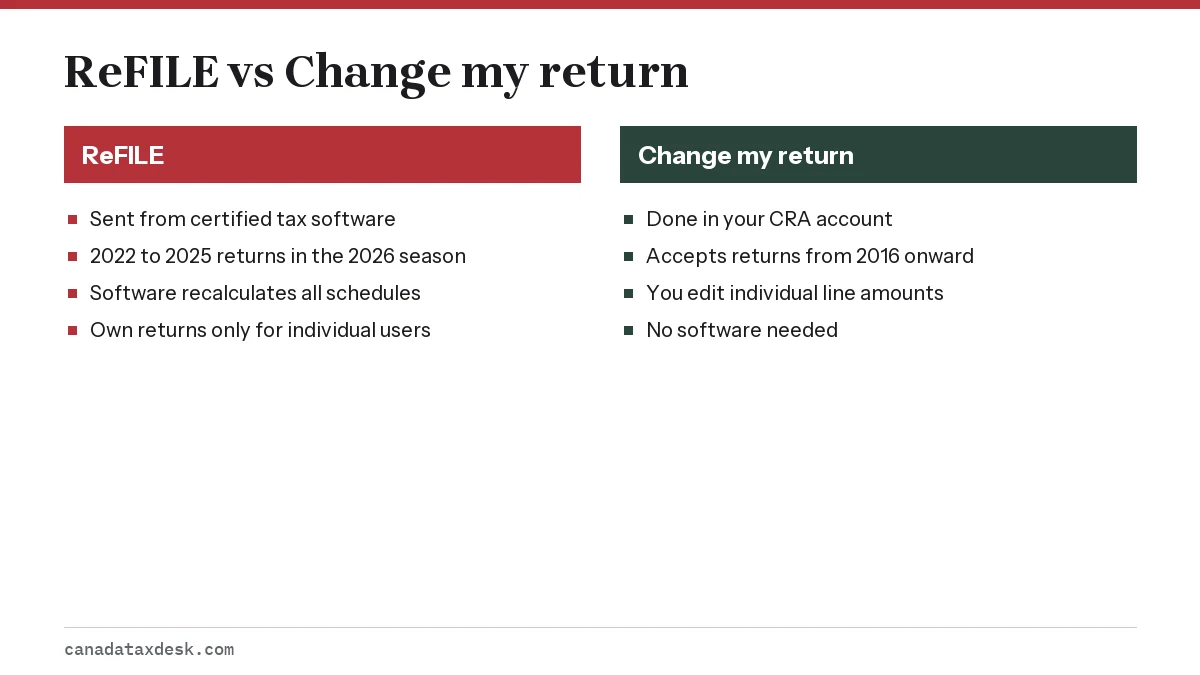
ReFILE and Change my return are both online and share the same 2-week processing standard. The choice usually comes down to where your data lives: if the corrected figures affect many schedules, letting your software recalculate them avoids arithmetic mistakes that a line-by-line edit in Change my return could introduce.
| Method | Years accepted | Where | Processing standard |
|---|---|---|---|
| ReFILE | 2022 to 2025 (2026 season) | Certified tax software | Within 2 weeks |
| Change my return | 2016 and later | CRA account (My Account) | Within 2 weeks |
| Form T1-ADJ | Up to 10 calendar years for a refund | Mail or CRA webform | 19 weeks on the change-your-return page (September 2026); a May 2026 CRA tax tip cites an 8-week standard for mail |
Pick T1-ADJ when the return falls outside both online services, or when your case is on the restriction list. For paper requests, check the CRA's processing-times tool before you mail, since the published figures shifted during 2026.
CRA ReFILE processing time and what happens next
The CRA's standard is to process online change requests within 2 weeks. A 2026 CRA tax tip said more than half of online change requests are handled without asking for documents, while requests that need a deeper review can take up to 49 weeks.
- You receive a confirmation number at transmission. This means the change was accepted for processing, not that it was approved.
- The CRA may send a letter asking for receipts. Answer by the date on the letter, ideally by uploading documents in your CRA account.
- The CRA issues a notice of reassessment. From February 2026, digital notices are only viewable in My Account, and paper notices go to the address on file, not the address typed into your software.
- Any refund goes to your direct deposit or address on file. Any extra balance owing is due right away, and the CRA generally charges interest back to the original balance-due date for that year.
If you disagree with the reassessment
Sending another ReFILE is not the route for a dispute. File a formal objection, generally within 90 days of the date on the notice of reassessment, online or on Form T400A.
Which ReFILE requests take longer than 2 weeks?
The CRA's change-your-return page, updated September 29, 2026, says certain requests may take up to 35 weeks to process. The longer time applies to changes involving:
- Several tax returns at once
- Tax years beyond the normal 3-year reassessment period
- A bankruptcy return
- A deceased taxpayer
- A carryback amount, such as a capital or non-capital loss
- The elected split-pension amount
- A CRA request to you or your authorized representative for more information or documents
The same page now gives 19 weeks for requests sent by mail, longer than the 8-week standard a May 2026 CRA tax tip described, so an online ReFILE remains the faster route when your return qualifies. If you are amending 2022, the oldest ReFILE year this season, the change may fall outside the normal 3-year reassessment period and take longer for that reason.
Step by step
Wait for your notice of assessment
The CRA must have assessed the original return before it accepts a change.
Open the original return in certified software
Use the file you filed, or rebuild it as assessed, then choose the ReFILE option.
Correct the affected lines
Add missed slips or claims; leave personal and banking details unchanged.
Transmit and save the confirmation number
The CRA's preliminary check returns a confirmation number within seconds.
Watch for your notice of reassessment
Online requests are processed within 2 weeks in most cases; answer any request for receipts promptly.
Common questions
Can I ReFILE before I get my notice of assessment?
No. The CRA requires you to wait for your notice of assessment before any change request. A ReFILE sent earlier will be refused at the preliminary check.
How many years back can I ReFILE with the CRA?
In the 2026 season, ReFILE accepts 2022, 2023, 2024 and 2025 returns. The 2027 range is not yet announced; 2023 to 2026 is expected if the window moves forward one year as usual.
How long does a ReFILE take to process?
The CRA's standard for online change requests is 2 weeks. Some requests take longer: the CRA's change-your-return page lists cases such as carrybacks, split pensions and years beyond the normal 3-year reassessment period that can take up to 35 weeks, and a 2026 CRA tax tip says requests needing additional review can take up to 49 weeks.
Is ReFILE faster than Change my return?
Neither is faster by standard; both are online and share the 2-week target. ReFILE is more convenient when the change touches several schedules because the software recalculates everything for you.
Can I use ReFILE to change my address or bank account?
No. The ReFILE terms bar changes to name, address, date of birth, marital status and direct deposit. Update those in your CRA account instead.
Can I ReFILE my spouse's return from my software?
Only in their name and with their own return file. Individual ReFILE users may amend only their own returns, so each spouse sends their own ReFILE. A paid preparer registered for EFILE can amend clients' returns.
Sources
- NETFILE and ReFILE eligibility (CRA) canada.ca
- Changing a tax return (CRA) canada.ca
- ReFILE terms and conditions and privacy notice (CRA) canada.ca
- Making changes to your tax return, 2026 tax tip (CRA) canada.ca
- Filing an objection (CRA) canada.ca
We check figures against these official pages. Rules change; confirm anything that affects a deadline or payment with the agency before you act.
Tell us what happened
Describe your situation and our editors will use it to improve this guide. If you leave your email, we may reply with a pointer to the right page or official contact. We never share your details.
Related guides
 NETFILE Canada: How to File Your Tax Return Online
NETFILE Canada is the CRA service that receives a personal T1 return sent straight from certified tax software. For the current s…
Change My Return CRA: Fix a Mistake on Your Tax Return
Change my return is the CRA's online service in My Account for correcting a personal tax return that has already been assessed. I…
Notice of Reassessment: Why the CRA Changed Your Return
A notice of reassessment (NOR) is the updated result the CRA sends when it changes a return it has already assessed. It follows a…
T1 Adjustment Request: How to Use Form T1-ADJ by Mail
A T1 adjustment request is the paper route for asking the CRA to change an individual return it has already assessed. You complet…
NETFILE Quebec: Filing Your Quebec and Federal Returns
NETFILE Quebec is really two transmissions. A Quebec resident sends a federal T1 to the CRA through NETFILE and a separate provin…
NETFILE Canada: How to File Your Tax Return Online
NETFILE Canada is the CRA service that receives a personal T1 return sent straight from certified tax software. For the current s…
Change My Return CRA: Fix a Mistake on Your Tax Return
Change my return is the CRA's online service in My Account for correcting a personal tax return that has already been assessed. I…
Notice of Reassessment: Why the CRA Changed Your Return
A notice of reassessment (NOR) is the updated result the CRA sends when it changes a return it has already assessed. It follows a…
T1 Adjustment Request: How to Use Form T1-ADJ by Mail
A T1 adjustment request is the paper route for asking the CRA to change an individual return it has already assessed. You complet…
NETFILE Quebec: Filing Your Quebec and Federal Returns
NETFILE Quebec is really two transmissions. A Quebec resident sends a federal T1 to the CRA through NETFILE and a separate provin…