
Topic
CRA My Account: what it does and how to use it safely
CRA My Account is the Canada Revenue Agency's secure online portal for individuals, and you reach it from the official Sign in to your CRA account page on canada.ca with a CRA user ID, your online banking, or a BC or Alberta digital ID. Once registered, you can check your return status, read notices of assessment, see RRSP and TFSA room, set up direct deposit and change a filed return. Since February 2026 you also need a backup multi-factor option.
8 guides in this topic Updated October 13, 2026
- CRA AI Chatbot Charlie: What It Can and Cannot AnswerCharlie is the Canada Revenue Agency's chatbot, a generative AI virtual assistant available around the clock on CRA pages on Canada.ca and, during se…
- CRA Account Locked: How to Unlock It and Get Back In FastA CRA account locked after wrong passcodes usually reopens by itself after 30 minutes. If it locks 3 times, or you have forgotten your user ID, passw…
- CRA Backup Multi-Factor Authentication: What ChangedCRA multi-factor authentication asks for a one-time passcode each time you sign in, and every CRA account user needs at least one MFA option. The CRA…
- CRA Direct Deposit: How to Set It Up for Tax RefundsCRA direct deposit sends your tax refund and benefit payments straight into a Canadian bank or credit union account. Sign up in My Account under Prof…
- CRA Login Help: Sign-In Link, Locked Account and MFA FixesFor CRA login help, start at the official Sign in to your CRA account page on canada.ca and pick the route you registered with: a CRA user ID and pas…
- CRA Scam or Real? How to Check a CRA Letter, Text or CallTo spot a CRA letter scam, compare the message with how the CRA really works. The CRA does call and mail letters, but it never threatens arrest, neve…
- Change CRA Direct Deposit: Update Your Bank AccountA CRA direct deposit change made in My Account or through your new bank's online banking is recorded the next business day. A mailed paper form can t…
- Register for CRA My Account: Step-by-Step for First-TimersTo register for CRA My Account, have your SIN, date of birth and figures from an assessed tax return filed in the last 2 years ready. Pick a sign-in…
What CRA My Account does
CRA My Account is the individual side of the CRA account, the government's secure portal for your personal tax file. It shows you what the CRA already knows about you: the returns it has processed, the slips employers and banks sent in, the room left in your registered plans and any balance you owe.
It has become harder to manage taxes without it. Starting in February 2026 the CRA made digital notices of assessment and reassessment viewable only in My Account, and it stopped sending copies of tax slips to people who phone in for them. The account is now the main place to get your own records.
This guide is written by the Canada Tax Desk editorial team, an independent site. We are not the CRA. Sign in only through the official Sign in to your CRA account page on canada.ca, and never type your details into a link sent by text or email.
Is CRA My Account free?
Yes. The CRA does not charge to register for or use My Account. Any website or caller asking for a fee to set up or reopen your CRA account is not the CRA.
Read the video transcript
CRA My Account: what it does and how to use it safely
CRA My Account is the Canada Revenue Agency's secure online portal for individuals.
Who runs it: The Canada Revenue Agency, through canada.ca.
Sign-in methods: CRA user ID and password, Sign-In Partner (online banking), provincial partner (BC, Alberta).
To register you need: SIN, date of birth, and amounts from an assessed return filed in the last 2 years.
The official sign-in page on canada.ca offers three routes. You pick one when you register, and you can add or switch later.
Registration is a one-time setup that ties a sign-in method to your social insurance number.
Most people log in a few times a year: once to check that a return was received, once to read the assessment and again when a slip or letter needs attention.
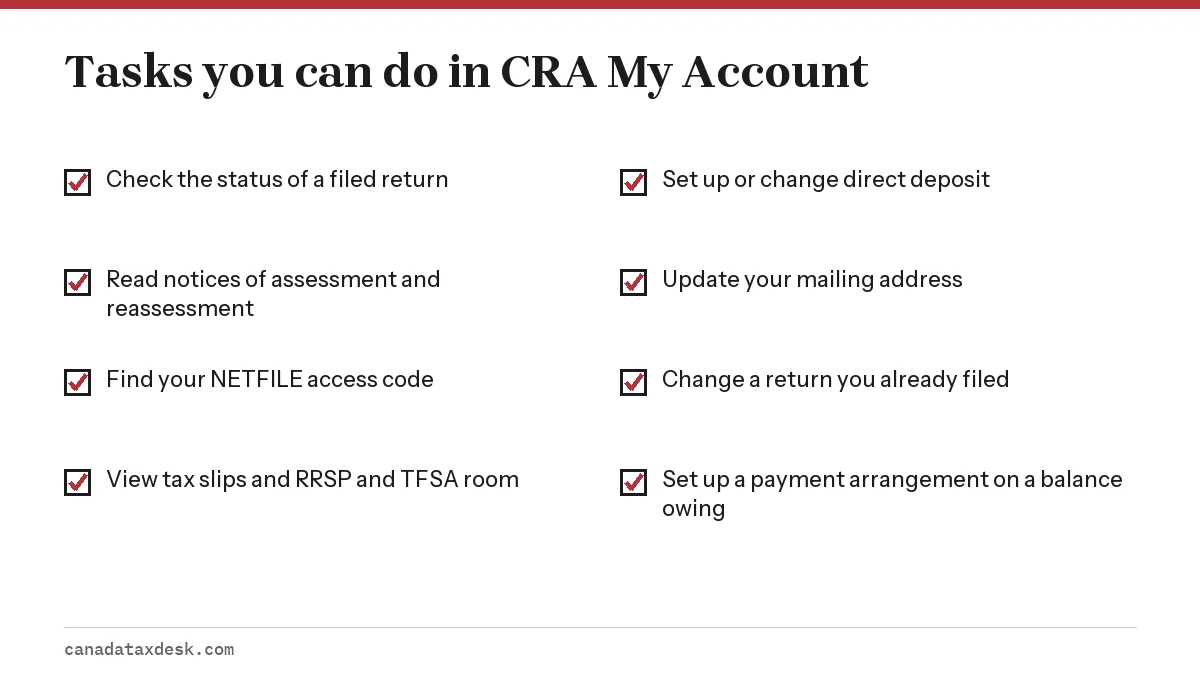
What can I do in CRA My Account? You can check return status, read notices of assessment, view slips, see RRSP and TFSA limits, change a filed return, update your address and set up direct deposit.
Ways to sign in to CRA My Account
The official sign-in page on canada.ca offers three routes. You pick one when you register, and you can add or switch later. Our CRA login help page compares them in detail and covers the error messages people run into.
| Option | What you use | Who it suits |
|---|---|---|
| CRA user ID and password | Credentials you create on the CRA site | Anyone; keeps your bank out of the process |
| Sign-In Partner | Your online banking username and password, through Interac | People who bank with a participating bank or credit union |
| Provincial partner | BC Services Card or Alberta.ca Account | BC and Alberta residents, including people who have never filed |
The Sign-In Partner route does not give the government your banking data. The CRA says your banking information and the name of your financial institution are not shared with it. It simply lets your bank vouch that you are the person signing in.
How do I register for CRA My Account?
Registration is a one-time setup that ties a sign-in method to your social insurance number. You need your SIN, your date of birth and amounts from your most recent assessed income tax return, which must be from within the last 2 years. You also need to enrol in multi-factor authentication during setup.
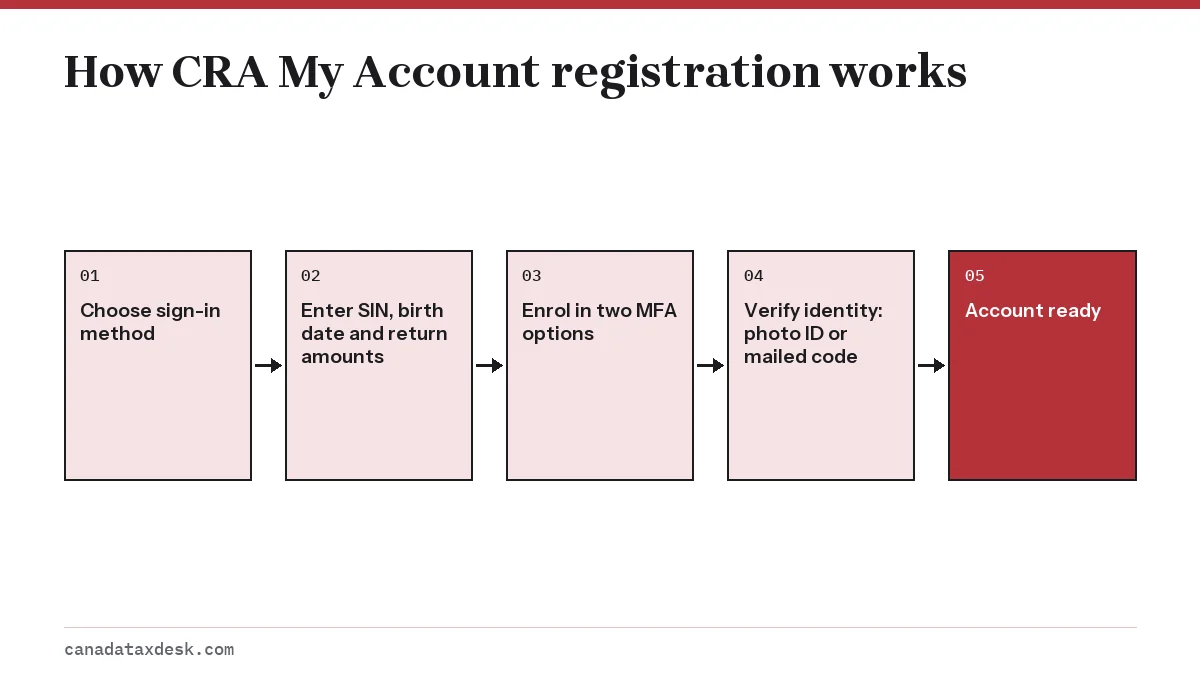
The last step, proving who you are, can go two ways. With the document verification service you photograph a government photo ID and your face on a phone, and you get full access right away; it is open to people 16 and older. The alternative is a CRA security code sent by mail within 10 business days, with limited access until you enter it.
The full walkthrough, including what to do if you filed for the first time last spring, is in our step-by-step guide to register for CRA My Account.
Main tasks you can do in My Account
Most people log in a few times a year: once to check that a return was received, once to read the assessment and again when a slip or letter needs attention. The checklist below covers the tasks the CRA lists for individuals.
Returns, notices and refunds
Tax returns shows the processing status of each year you filed and links to the notice of assessment once it is ready. The 8-character NETFILE access code for your next return also appears there. If you spot a mistake after filing, the Change my return option lets you fix most lines online.
Banking, address and payments
The Profile page holds your mailing address and banking details. Setting up CRA direct deposit there is the quickest way to get refunds, and switching to a new bank later takes a few minutes; see how to change CRA direct deposit. If you owe $1,000 or more in personal tax, you can set up a payment arrangement yourself under Manage balance.
Slips, limits and mail
You can view T4, T5 and other slips the issuers filed, your RRSP deduction limit, TFSA details and carryforward amounts. CRA mail, including review letters, can be delivered to the account instead of by post, with an email alert when something new arrives.
Security and backup multi-factor authentication
Every CRA sign-in now asks for a one-time passcode on top of your password. Options include a text message or phone call, a third-party authenticator app that makes a 6-digit code every 30 seconds, and a printed passcode grid.
From February 2026 the CRA requires a second, backup method on file, such as a passcode grid or an authenticator app, so a lost phone does not shut you out. Our page on CRA multi-factor authentication explains which pairing works best and how to add one.
CRA My Account for individuals in the 2027 filing season
Several 2026 changes make the account more central when you file your 2026 return in 2027. Digital notices of assessment can only be viewed in the account, so it is where the result of your return shows up online. Slip copies are no longer given out by phone either.
Tax software also leans on the account. The Auto-fill my return feature asks you to sign in with your CRA credentials so the software can pull in slips and carryforward amounts, which saves retyping and catches missing slips. If your sign-in is broken in March, you lose that shortcut.
Budget 2025 also proposed automatic filing for some lower-income people with simple tax situations, starting with the 2026 tax year. Under the proposal, pre-filled returns would be made available in My Account. The CRA has not yet published how or when people will be told they are included, so treat any unexpected message about automatic filing with the same caution as any other unsolicited contact.
| Item | Date |
|---|---|
| NETFILE opens for 2026 returns | Not yet announced (usually published in the fall) |
| Filing and payment deadline, most people | April 30, 2027 |
| Filing deadline, self-employed | June 15, 2027 (payment still due April 30) |
| Notice of assessment, online returns | CRA standard: within 2 weeks |
When CRA My Account does not work
Most access problems fall into four groups. Start with the one that matches the message on your screen.
| What you see | Likely cause | First step |
|---|---|---|
| Temporarily locked | Too many wrong passcodes | Wait 30 minutes, then try another MFA option |
| Forgot user ID or password | Credentials lost | Register again to create new sign-in details |
| Security code expired | Code not entered in time | Request a new code from the sign-in page |
| Cannot register | No assessed return in the last 2 years | File a return first, or use a BC or Alberta provincial partner |
A lock caused by wrong passcodes lasts 30 minutes, but after 3 lockouts the account stays locked until the CRA releases it. Our CRA account locked page covers self-service recovery and the cases where you have to call.
Do not re-register as a workaround if the CRA locked the account for security reasons. Registration cannot undo that kind of lock, and the CRA asks you to contact it instead.
If you cannot find what you need in the account itself, the CRA's chatbot can point you at the right page on Canada.ca, within limits worth knowing. See Charlie, the CRA chatbot.
Common questions
What can I do in CRA My Account?
You can check return status, read notices of assessment, view slips, see RRSP and TFSA limits, change a filed return, update your address and set up direct deposit. You can also apply for the Canada child benefit and read CRA mail online.
How do I log in to CRA My Account for the first time?
You first register on canada.ca with your SIN, date of birth and amounts from a return assessed in the last 2 years. After that, you sign in with the method you chose: CRA user ID, online banking, or a BC or Alberta provincial ID.
Why do I need a security code for My Account?
The mailed security code proves you live at the address on your tax file. Until you enter it, you have limited access. You can skip the wait by using the document verification service with photo ID, if you are 16 or older.
Can I use My Account if I have never filed taxes?
Usually not, because registration asks for amounts from an assessed return. The exception is BC and Alberta residents, who can register through their provincial digital ID even without a filing history.
Is My Account the same as My Business Account?
No. My Account covers your personal income tax and benefits. My Business Account is for a business number, including GST/HST and payroll accounts, although both are reached through the same CRA sign-in.