
How to register for CRA My Account, step by step
Short answer
To register for CRA My Account, have your SIN, date of birth and figures from an assessed tax return filed in the last 2 years ready. Pick a sign-in method, enrol in two multi-factor options, then prove your identity with photo ID on a phone for instant access, or wait up to 10 business days for a mailed security code.
- 01Identity number
- SIN, or a temporary tax number, individual tax number or NRRN
- 02Return needed
- Your most recent assessed return, from the last 2 years
- 03Instant option
- Document verification with photo ID, age 16 and older
- 04Mailed option
- CRA security code sent within 10 business days
- 05MFA at setup
- Enrol in 2 options
- 06Never filed?
- Possible only through a BC or Alberta provincial partner
What you need before you register for CRA My Account
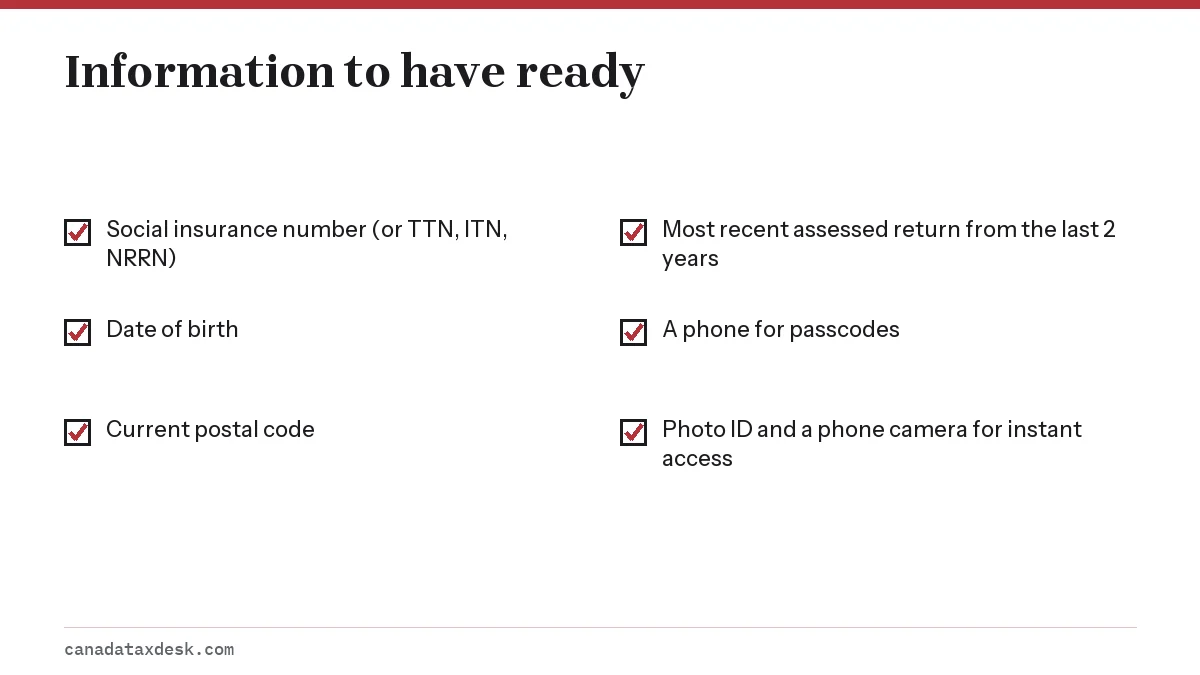
Registering for CRA My Account goes fastest when the paperwork is on the desk before you start. The CRA matches what you type against your tax file, so figures have to be exact, not rounded.
Which return amounts the CRA asks for
You will be asked for amounts from a specific line of your most recent assessed return. The return has to meet two conditions: it is the latest one the CRA has assessed, and it is from within the last 2 years. Until your 2026 return is assessed next year, that normally means your 2025 return, or your 2024 return if the 2025 one has not been assessed yet. If that return was later reassessed, enter the amounts you originally reported, not the changed ones.
Keep a copy of that return or its notice of assessment open. If you used tax software, the saved return file or a PDF printout shows every line. The registration screen names the line it wants, so have the whole return in front of you rather than one figure.
Photo ID and a phone, if you want instant access
For immediate full access you must be 16 or older and have a mobile device with a working camera plus an accepted photo ID that is not expired or damaged: a Canadian driver's licence, a Canadian permanent resident card, a provincial or territorial photo ID card, a Secure Certificate of Indian Status issued from February 2019, or a Canadian, Australian, British or New Zealand passport. Provincial health cards and photocopies are not accepted. Without an accepted ID you can still register, but you will wait for a mailed code.
How to register for CRA My Account step by step
The CRA splits sign-up into five stages. The flow below shows them in order; the numbered steps give the detail.
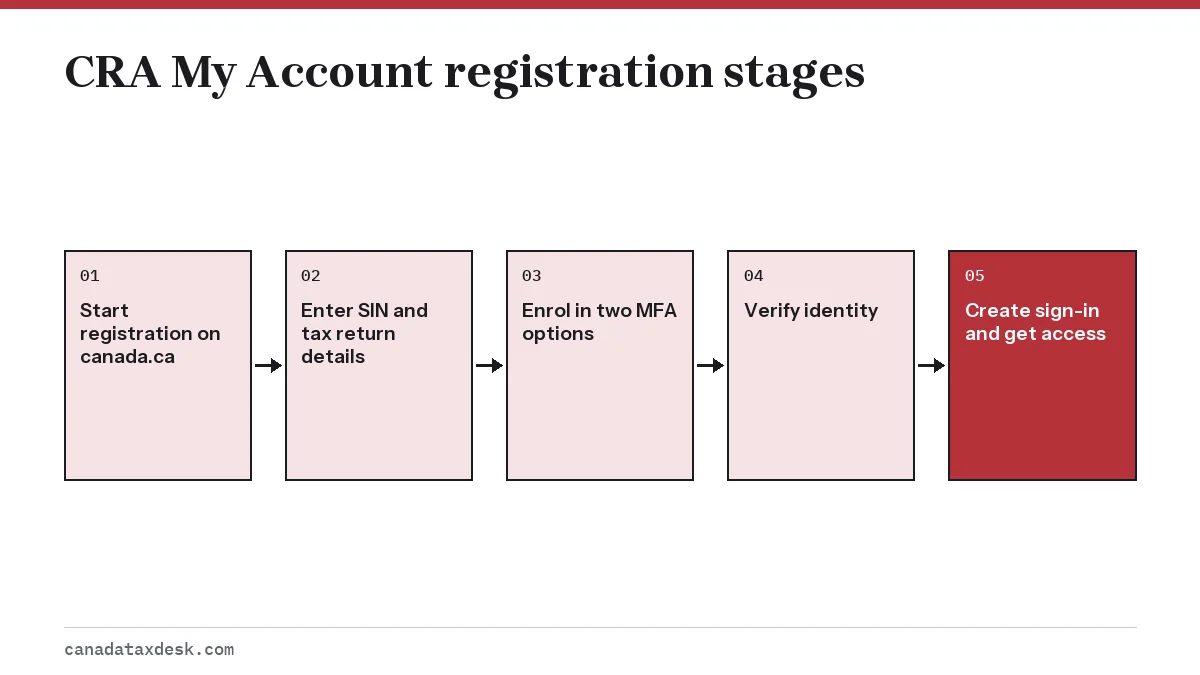
- Go to the Sign in to your CRA account page on canada.ca and choose to register for personal access.
- Pick a sign-in method. Choose CRA user ID if you want credentials that survive a bank switch, or a Sign-In Partner to reuse your online banking. BC and Alberta residents can also pick their provincial ID. GCKey cannot be used for a CRA account.
- Enter your SIN, date of birth, current postal code and the requested amount from your assessed return.
- Enrol in two multi-factor authentication options, for example a text to your cell phone plus a passcode grid or authenticator app.
- Verify your identity: use document verification for instant access, or ask for a CRA security code by mail.
- If you chose the mailed code, sign in again when it arrives and enter it before it expires to switch on full access.
When you create a CRA user ID, you also set security questions. Choose answers you will remember exactly as typed, because wrong answers count toward a lockout. The registration session also expires after 18 minutes of inactivity and your progress is not saved, so keep your documents at hand before you begin.
Security code by mail vs document verification
This choice decides how soon you can use the account. Both are legitimate, and neither costs anything.
| Document verification | CRA security code by mail | |
|---|---|---|
| Access | Full, immediately | Limited until the code is entered |
| What you need | Phone camera, photo ID, a selfie | Correct mailing address on file |
| Age limit | 16 or older | None stated |
| Timing | Minutes | Mailed within 10 business days |
| Main risk | Photo rejected if blurry or ID expired | Code expires if not entered in time |
How long does the CRA security code take?
The CRA mails the code within 10 business days to the address it has on file, so plan for that window plus normal mail delivery time. If nothing has arrived after 10 business days, you can ask for a new one. Check your address in the file first: a code sent to an old address will never reach you.
Can I register without a security code?
Yes. Document verification replaces the mailed code, and a BC or Alberta provincial partner also gives full access without one. What you cannot skip is the identity check itself.
Registering for CRA My Account as a first-time filer
Newcomers, students and young workers often try to sign up before filing, and the system turns them away. The reason is the return amount: if the CRA has never assessed a return for you, there is nothing to match.
The fix is to file first. The CRA's standard is to issue a notice of assessment within 2 weeks for returns filed online, and after that you can register using figures from that return. Our first tax return in Canada guide covers filing without prior history, and you leave the NETFILE access code field blank the first time.
People without a SIN can register with a temporary tax number, an individual tax number or a non-resident representative number instead.
Why does CRA My Account registration fail?
Registration fails for a small set of reasons. Match your situation to the list before trying again, since repeated wrong entries lock the process.
- The return amount is rejected. Check you are reading the most recent assessed year and the exact line requested, including cents.
- The system says you have no recent return. Your last assessed return is older than 2 years. File the missing years, then register.
- The photo ID check fails. Retake in good light with the whole card in frame, and make sure the ID has not expired. If it still fails, switch to the mailed code.
- The mailed code expired. Sign in and request a new one; the old code will not work.
- You are locked out. Wrong entries on the security code or document check lock the account. See CRA account locked for recovery.
- The session timed out. After 18 minutes of inactivity the registration session ends and nothing you entered is saved. Start again with your details ready.
Once registered, set a backup passcode method straight away; our page on CRA multi-factor authentication explains the options. For a tour of what is inside, read the CRA My Account guide, and if a sign-in problem appears later, the CRA login help page has fixes.
After you register: five settings to check first
A new account works straight away, but a few settings decide whether it keeps working and whether you hear about problems. Spend ten minutes on these the first time you sign in with full access.
- Confirm your mailing address under Profile. It is where the CRA sends security codes and paper letters.
- Turn on email notifications so you are told when new CRA mail arrives or when your address or banking details change.
- Add banking details for CRA direct deposit so refunds skip the cheque stage.
- Check that two multi-factor options are listed and that at least one does not depend on your cell phone.
- Note where your NETFILE access code appears under Tax returns, ready for next season's filing.
If you file for other people, such as an elderly parent, do not use their sign-in. They can authorize you as a representative instead, and you then reach their file through Represent a Client with your own credentials.
Step by step
Gather your details
Have your SIN, date of birth, postal code and your most recent assessed tax return from the last 2 years.
Choose a sign-in method
Pick CRA user ID and password, a Sign-In Partner, or a BC or Alberta provincial partner on the canada.ca sign-in page.
Enter your tax details
Type your SIN, date of birth, postal code and the exact amount requested from your return.
Enrol in multi-factor authentication
Set up two MFA options, such as a phone number and a passcode grid or authenticator app.
Verify your identity
Use document verification with photo ID for instant access, or request a CRA security code by mail.
Enter your security code
If you chose mail, sign in when the code arrives within 10 business days and enter it before it expires.
Common questions
Do I need last year's tax return to register for CRA My Account?
You need amounts from your most recent assessed return, and it must be from the last 2 years. That is usually last year's return, or the year before if last year's has not been assessed.
How do I sign up for CRA My Account without waiting for the mail?
Choose the document verification service. On your phone you photograph an accepted photo ID, such as a Canadian driver's licence, permanent resident card, provincial or territorial photo ID card or passport, and take a selfie. If you are 16 or older and the check passes, you get full access right away.
Why does CRA registration say my information does not match?
The most common cause is a return amount from the wrong year or a rounded figure. Use the latest assessed return and copy the line exactly, including cents. Your postal code must also match the address the CRA has on file. If that return was reassessed, use the amounts you originally reported.
Can I register for CRA My Account if I just arrived in Canada?
Not until the CRA has assessed a return for you, unless you live in BC or Alberta and use the provincial ID route. File your first return, wait for the notice of assessment, then register.
Can I use a permanent resident card or a foreign passport to register?
Yes for some documents. The document verification service accepts a Canadian permanent resident card and Australian, British and New Zealand passports, along with Canadian passports, driver's licences and provincial or territorial photo ID. Other foreign passports and provincial health cards are not accepted, so use the mailed CRA security code instead. Newcomers still need an assessed return first unless they register through BC or Alberta.
Can someone else register for My Account for me?
No. Registration is tied to your own SIN and identity check. A family member or accountant can be authorized as your representative instead, which gives them access through Represent a Client.
How long does it take to register for CRA My Account?
With document verification, you get full access as soon as the photo check passes. With the mailed security code, you have limited access until the code arrives, which the CRA mails within 10 business days.
Sources
- Register for a CRA account canada.ca
- My Account for individuals: CRA sign-in canada.ca
- Verify your identity: CRA account help canada.ca
- Check CRA processing times canada.ca
We check figures against these official pages. Rules change; confirm anything that affects a deadline or payment with the agency before you act.
Tell us what happened
Describe your situation and our editors will use it to improve this guide. If you leave your email, we may reply with a pointer to the right page or official contact. We never share your details.
Related guides
 CRA My Account: Sign In, Register and Fix Access Problems
CRA My Account is the Canada Revenue Agency's secure online portal for individuals, and you reach it from the official Sign in to…
CRA Login Help: Sign-In Link, Locked Account and MFA Fixes
For CRA login help, start at the official Sign in to your CRA account page on canada.ca and pick the route you registered with: a…
Filing Your First Tax Return in Canada: Step-by-Step
First time filing taxes in Canada means sending the CRA a T1 return for the first year you had income or lived here, and for tax…
CRA Backup Multi-Factor Authentication: What Changed
CRA multi-factor authentication asks for a one-time passcode each time you sign in, and every CRA account user needs at least one…
CRA Account Locked: How to Unlock It and Get Back In Fast
A CRA account locked after wrong passcodes usually reopens by itself after 30 minutes. If it locks 3 times, or you have forgotten…
CRA My Account: Sign In, Register and Fix Access Problems
CRA My Account is the Canada Revenue Agency's secure online portal for individuals, and you reach it from the official Sign in to…
CRA Login Help: Sign-In Link, Locked Account and MFA Fixes
For CRA login help, start at the official Sign in to your CRA account page on canada.ca and pick the route you registered with: a…
Filing Your First Tax Return in Canada: Step-by-Step
First time filing taxes in Canada means sending the CRA a T1 return for the first year you had income or lived here, and for tax…
CRA Backup Multi-Factor Authentication: What Changed
CRA multi-factor authentication asks for a one-time passcode each time you sign in, and every CRA account user needs at least one…
CRA Account Locked: How to Unlock It and Get Back In Fast
A CRA account locked after wrong passcodes usually reopens by itself after 30 minutes. If it locks 3 times, or you have forgotten…