
CRA account locked: how to unlock it and get back in
Short answer
A CRA account locked after wrong passcodes usually reopens by itself after 30 minutes. If it locks 3 times, or you have forgotten your user ID, password or security answers, you can register again online to create new sign-in details and keep your existing records. Only a lock the CRA placed for security reasons needs a phone call.
- 01Temporary passcode lock
- 30 minutes
- 02Permanent lock
- After 3 temporary lockouts
- 03Self-service recovery
- Register again online for new credentials, no call needed
- 04Not fixable online
- Locks the CRA placed for security reasons
- 05Filing while locked
- NETFILE through certified software still works
Why a CRA account gets locked
The CRA locks an account when someone enters wrong information too many times. That protects you if a stranger is guessing, but it also catches people who mistype. The CRA lists five places where repeated misses trigger a lock.
| Wrong entry | Type of lock | How it clears |
|---|---|---|
| CRA user ID or password | Credential lock | Register again for new sign-in details |
| One-time MFA passcode | 30-minute lock | Wait, or use another MFA option |
| Security questions | Credential lock | Register again for new sign-in details |
| CRA security code | Registration lock | Register again later, or contact the CRA |
| Document verification service | Registration lock | Choose the mailed code instead, or contact the CRA |
A separate category is a lock or revocation the CRA applies itself, for example when it sees signs that an account was compromised. That lock is deliberate, and nothing you do online will lift it.
How to reopen a locked CRA account yourself
The CRA offers self-service account recovery: its filing-season tips of January 27, 2026 said that people locked out because they forgot their sign-in information or security answers can now regain access online, with no need to call.
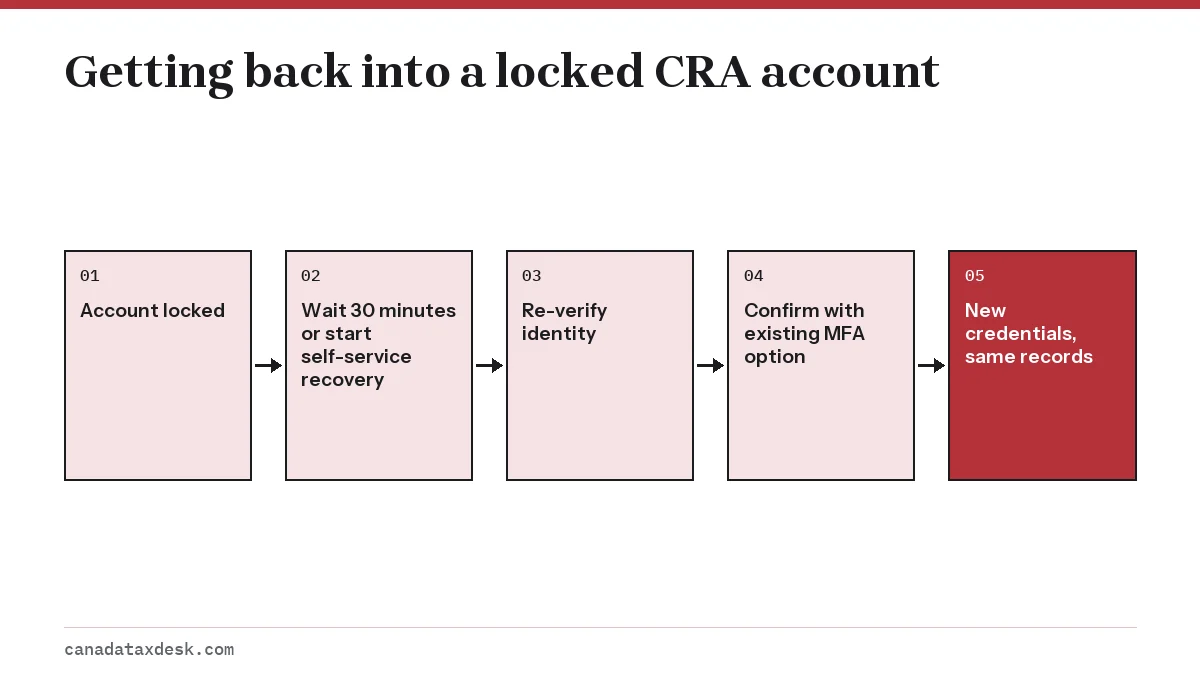
- If the lock came from wrong passcodes, wait the full 30 minutes. Do not keep retrying during the lock.
- After the wait, sign in and choose a different MFA option you already enrolled, such as your passcode grid or authenticator app.
- If you forgot your user ID, password or security answers, go to the canada.ca sign-in page and start registration again.
- Re-verify your identity with the document verification service or a CRA security code.
- Confirm with an MFA option you set up earlier, then create new credentials. Your tax records, mail and banking details stay in place.
Step 5 is where a backup MFA option pays off. Recovery asks for an existing passcode method, so people who only had one phone number on file and lost it are the ones most often forced to call. Our page on CRA multi-factor authentication explains how to add a second one.
When you need to call the CRA
Self-service does not cover every case. Call the CRA using the individual enquiries number on its official contact page if any of these apply.
- You have been locked out for wrong passcodes 3 times, which makes the lock permanent.
- The CRA locked or revoked your credentials for security reasons.
- You tried registering again and still cannot get in.
- You no longer have access to any MFA option you enrolled.
The CRA's contact page lists 1-800-959-8281 for help with a CRA account: select option 1 for online services. Lines are open Monday to Friday, 8 am to 8 pm ET; from outside Canada and the US, call 1-613-940-8495 (the CRA accepts collect calls on this line). If an error code appeared on screen, have it ready. Have your SIN, date of birth, address and a recent notice of assessment ready too. The agent will ask identifying questions before making changes. A genuine CRA agent will not ask for your banking password or a passcode you received by text.
Can I file my taxes if my CRA account is locked?
Yes. A locked CRA account does not stop you from filing. NETFILE runs through certified tax software and does not need a CRA login, so you can still transmit your return while you sort out access. Our NETFILE guide covers the process.
What you lose is convenience. The Auto-fill my return feature needs a working CRA login, so you will type slip amounts by hand. You also cannot see your notice of assessment until you are back in, because digital notices are only shown in My Account since February 2026.
The NETFILE access code on your last notice is optional, so leave it blank if you cannot retrieve it. The CRA has not yet announced when NETFILE opens in 2027 for 2026 returns; for 2025 returns it opened on February 23, 2026.
Preventing future CRA account locks
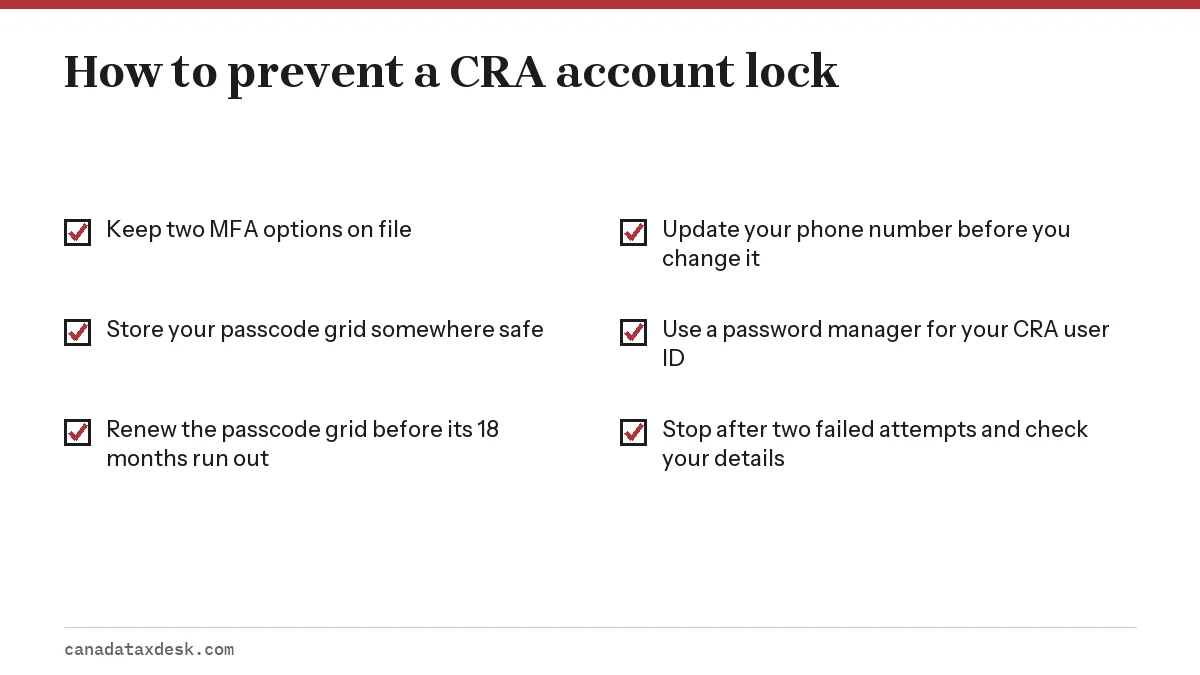
A few minutes of setup now avoids the phone queue later.
If your trouble is signing in rather than a lock, the CRA login help page covers routes and error messages. For an overview of the whole account, start with the CRA My Account guide.
Common questions
How long is a CRA account locked for?
A lock caused by wrong one-time passcodes lasts 30 minutes. After 3 such locks, the account stays locked until the CRA releases it. Credential locks from wrong passwords or security answers last until you register again or contact the CRA.
How do I unlock my CRA account online?
In most cases you can do it yourself. If the lock came from wrong passcodes, wait 30 minutes and sign in with another MFA option. If you forgot your sign-in details or security answers, go through registration again, re-verify your identity with photo ID or a security code, confirm with an existing MFA option and create new sign-in details. This does not work if the CRA locked the account for security reasons.
Will registering again delete my CRA account information?
No. Registering again only replaces your sign-in credentials. Your returns, notices, mail and banking details stay attached to your SIN.
Why is my CRA account locked when I did not try to sign in?
Someone else may have tried to guess your credentials. Once you are back in, review the sign-in history under Security settings and report anything you do not recognize to the CRA as suspicious activity.
Can I use my bank to get around a locked CRA user ID?
If your bank is a Sign-In Partner, you can register that route as another way in. It will not bypass a lock the CRA placed on the account itself.
My bank sign-in (Sign-In Partner) is locked. Can the CRA unlock it?
No. A Sign-In Partner login is your online banking user ID and password, and the CRA tells you to contact your financial institution for help with it. If your banking sign-in details changed or you are locked out, the CRA says you can go through its registration process again to regain access, for example by creating a CRA user ID.
Sources
- Locked account: CRA account help canada.ca
- My Account for individuals: CRA sign-in canada.ca
- What you need for the 2026 tax-filing season canada.ca
- Multi-factor authentication: CRA account help canada.ca
We check figures against these official pages. Rules change; confirm anything that affects a deadline or payment with the agency before you act.
Tell us what happened
Describe your situation and our editors will use it to improve this guide. If you leave your email, we may reply with a pointer to the right page or official contact. We never share your details.
Related guides
 CRA My Account: Sign In, Register and Fix Access Problems
CRA My Account is the Canada Revenue Agency's secure online portal for individuals, and you reach it from the official Sign in to…
CRA Login Help: Sign-In Link, Locked Account and MFA Fixes
For CRA login help, start at the official Sign in to your CRA account page on canada.ca and pick the route you registered with: a…
CRA Backup Multi-Factor Authentication: What Changed
CRA multi-factor authentication asks for a one-time passcode each time you sign in, and every CRA account user needs at least one…
CRA My Account: Sign In, Register and Fix Access Problems
CRA My Account is the Canada Revenue Agency's secure online portal for individuals, and you reach it from the official Sign in to…
CRA Login Help: Sign-In Link, Locked Account and MFA Fixes
For CRA login help, start at the official Sign in to your CRA account page on canada.ca and pick the route you registered with: a…
CRA Backup Multi-Factor Authentication: What Changed
CRA multi-factor authentication asks for a one-time passcode each time you sign in, and every CRA account user needs at least one…
 NETFILE Canada: How to File Your Tax Return Online
NETFILE Canada is the CRA service that receives a personal T1 return sent straight from certified tax software. For the current s…
NETFILE Canada: How to File Your Tax Return Online
NETFILE Canada is the CRA service that receives a personal T1 return sent straight from certified tax software. For the current s…