
NETFILE access code: where to find it and when you need it
Short answer
The NETFILE access code is an 8-character code of letters and numbers printed on the right side of your most recent notice of assessment. You can also see it in My Account under Tax returns. Entering it in your tax software is not mandatory, and first-time filers will not have one. For a 2026 return filed in 2027, use the code from the notice for your 2025 return.
- 01Format
- 8 characters, letters and numbers
- 02Where it is printed
- Right side of your most recent notice of assessment
- 03Online location
- My Account, Tax returns section
- 04Required?
- No, entering it is optional
- 05First-time filers
- No code; leave the field blank
- 06New for 2027
- Optional CRA account sign-in before sending a 2026 return
What the NETFILE access code is
The NETFILE access code is a short identifier the CRA prints on your notice of assessment so your tax software can prove the return comes from you. It is 8 characters long and mixes letters and numbers. When you enter it, the CRA can use details from your last assessed return to confirm your identity before it accepts the new one.
It is not a password and it does not sign you in to anything. It is also unrelated to your CRA account user ID.
Is the NETFILE access code mandatory?
No. The CRA says entering the code is not mandatory. If you leave it blank, the CRA cannot use information from your previous return to confirm who you are, so it relies on other identifying information instead. The CRA can still process the return electronically either way.
Where to find the NETFILE access code on your notice of assessment
Look on the right side of your most recent notice of assessment, the document the CRA issues after it processes a return. On paper or in a PDF copy, scan the right-hand side for a line labelled as the access code rather than looking through the tax calculation.
Only the code on your most recent notice counts. The table below shows which notice to use for the return you are filing now.
| Return you are filing | When you file it | Use the code from |
|---|---|---|
| 2025 return | Now, until January 29, 2027 | Notice of assessment for your 2024 return |
| 2026 return | 2027 season (opening date not yet announced) | Notice of assessment for your 2025 return |
| Any return, first time filing | Any time | No code exists; leave blank |
If you cannot tell which notice is your latest, our guide to the notice of assessment explains the layout, the tax year shown at the top and the date it was issued.
Read the video transcript
The NETFILE access code
It is an 8-character code of letters and numbers, printed on the right side of your latest notice of assessment.
You can also find it in CRA My Account, in the Tax returns section.
Entering it is optional. Your return will still go through without it.
The code confirms your identity and lets the CRA check some details before assessment.
Filing for the first time? You do not have a code. Leave the field blank.
The CRA never asks for this code by text or email. Treat any such message as a scam.
Finding the NETFILE access code in My Account
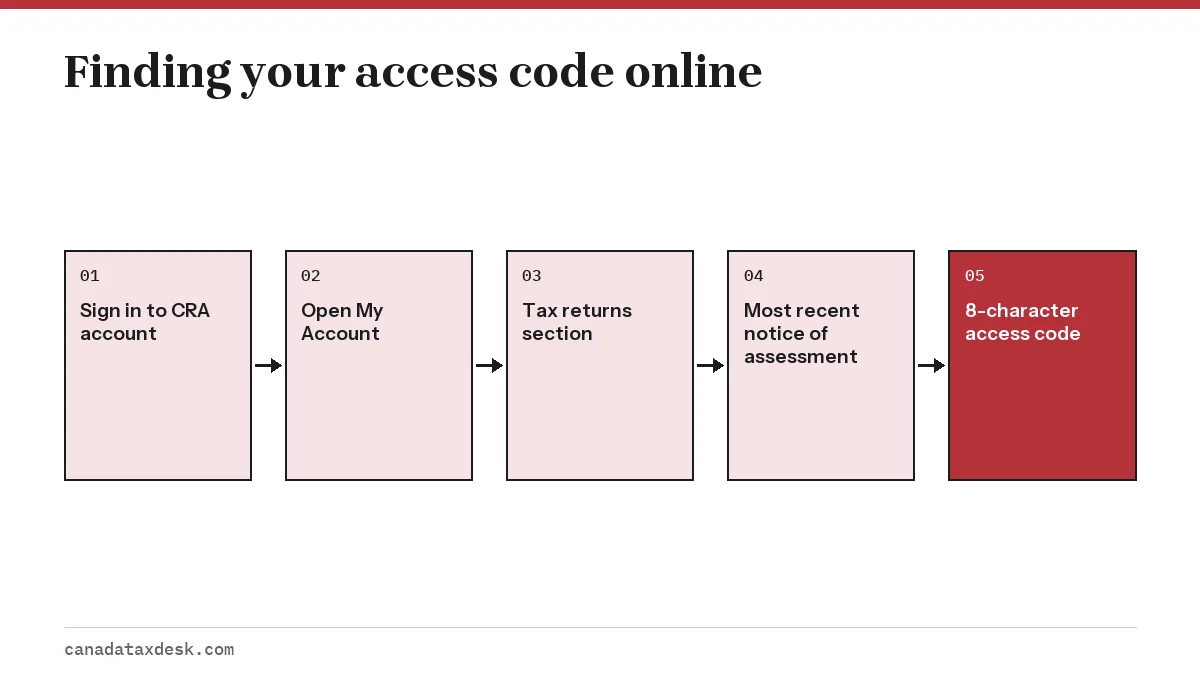
The CRA said that from February 2026 the 8-character code would be easier to find inside your CRA account, under Tax returns in My Account. That matters because, starting that same month, digital notices of assessment are shown only in My Account. If you chose online mail, there may be no paper notice in a drawer to check. If you use Auto-fill My Return, the CRA says the access code is filled in automatically.
- Sign in to your CRA account on canada.ca.
- Open My Account for individuals.
- Select the Tax returns section.
- Read the 8-character access code shown for your most recent notice of assessment.
- Copy it into the access code field in your tax software, taking care with similar characters such as 0 and O.
If you cannot sign in, see CRA login help. If the notice itself is missing from the account, where is my notice of assessment covers the usual reasons, such as a return that is still being processed.
Filing without an access code
You can send your return without the code. This is the simplest option if you cannot find your notice, cannot sign in to your account, or are filing at the last minute before the April 30 deadline. Leave the field blank rather than typing a code from an older notice, since the CRA points filers to the code on their most recent notice.
What you lose is one way of confirming your identity. The CRA will lean more on your name, date of birth and SIN, so check those carefully. If they do not match CRA records, the transmission can be refused; our page on a NETFILE rejected return explains how to correct and resend.
What changes for the access code in the 2027 filing season?
For a 2026 return filed in 2027, enter the code from the notice of assessment for your 2025 return. If you are still filing your 2025 return, NETFILE accepts it until January 29, 2027, and the notice the CRA issues for it becomes your most recent notice, so it holds the code for your next return. The CRA has not yet announced the date NETFILE opens for 2026 returns.
The CRA has also announced a new optional authentication step, marked as new for February 2027. Before submitting a 2026 return, tax software users, both individuals filing their own taxes and representatives filing for others, will have the option to sign in to their CRA account. The CRA describes it as an extra layer of security that verifies who is filing and helps guard against unauthorized or fraudulent returns.
- The sign-in step is optional, like the access code. If you skip it, the CRA uses other information to confirm your identity.
- To use it you need a CRA account you can sign in to, so register or fix sign-in problems before tax season.
- The CRA announcement does not say the access code field is going away, so keep the code from your latest notice at hand as well.
NETFILE access code for first-time users
If this is your first Canadian return, you have never received a notice of assessment, so there is no code to enter. The CRA confirms this: first-time filers will not have an access code. Leave the field empty and complete the rest of the return.
First-time filers should also tell the software that this is their first return and enter their full legal name, including any second name. Newcomers, students and young people filing for the first time can use our first tax return guide for the rest of the setup.
NETFILE access code vs GST/HST access code
The two codes are easy to confuse because both carry the word NETFILE, but they belong to different programs and cannot be swapped.
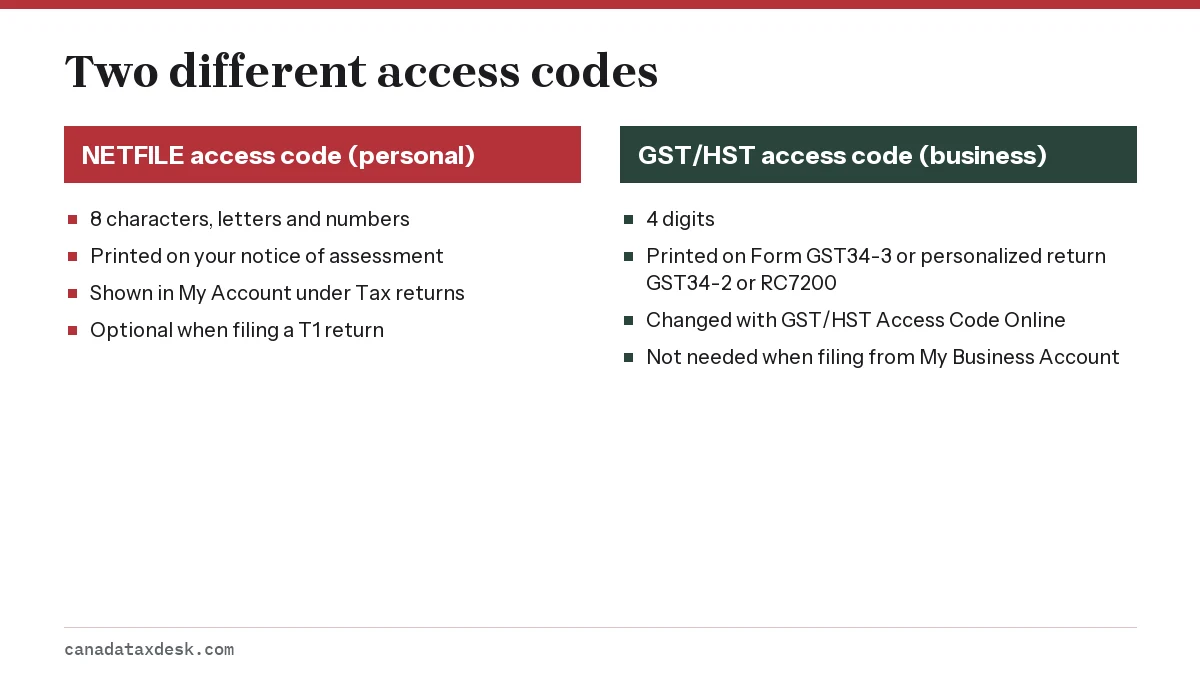
If you run a small business and file sales tax returns, the GST/HST access code page explains how to get or change the 4-digit code. For your personal T1 return, only the 8-character code from your notice of assessment applies. More on the personal filing service is in our NETFILE Canada guide.
Step by step
Sign in
Sign in to your CRA account and open My Account.
Open Tax returns
Go to the Tax returns section.
Read the code
Note the 8-character access code for your most recent notice of assessment.
Enter it in software
Type it into the access code field, or leave the field blank if you have no code.
Common questions
Where is my NETFILE access code?
It is on the right side of your most recent notice of assessment. You can also see it by signing in to My Account and opening the Tax returns section.
Is the NETFILE access code required to file?
No. It is optional. Without it, the CRA confirms your identity using other information, and you can still send your return through NETFILE.
Does the NETFILE access code change every year?
The CRA tells filers to take the code from their most recent notice of assessment, so check your latest notice each time you file rather than reusing a code from an older one.
What if I do not have a NETFILE access code?
Leave the field blank and file anyway. First-time filers never have one, and anyone who cannot find their notice can file without it.
Is the NETFILE access code the same as my CRA account password?
No. The access code is printed on your notice of assessment and is used only inside tax software. Your CRA account user ID and password are separate sign-in details and should never be typed into the access code field.
How do I get a NETFILE access code?
You do not apply for one. The CRA creates it when it processes a return and prints it on the right side of the notice of assessment, which you can view or print in your CRA account. If you want a paper copy of the notice mailed to you, the CRA says you need to call to request it. If you have never filed, there is no code; leave the field blank.
Is the NETFILE access code the same as the NETFILE confirmation number?
No. You enter the access code before you send the return, and it is optional. The confirmation comes afterwards: your tax software shows a message with a code that confirms the CRA received your completed return. Keep it with your tax records.
Sources
- Completing a tax return: NETFILE access code (Canada.ca) canada.ca
- Notices of assessment (Canada.ca) canada.ca
- What you need to know for the 2026 tax-filing season (Canada.ca) canada.ca
- Get a GST/HST access code (Canada.ca) canada.ca
We check figures against these official pages. Rules change; confirm anything that affects a deadline or payment with the agency before you act.
Tell us what happened
Describe your situation and our editors will use it to improve this guide. If you leave your email, we may reply with a pointer to the right page or official contact. We never share your details.
Related guides
 NETFILE Canada: How to File Your Tax Return Online
NETFILE Canada is the CRA service that receives a personal T1 return sent straight from certified tax software. For the current s…
Notice of Assessment: How to Read Your CRA NOA Line by Line
A notice of assessment (NOA) is the CRA's summary of how it assessed your income tax and benefit return. It shows whether you get…
Where Is My Notice of Assessment? Get a Copy Online
Your notice of assessment is in your CRA account, where you can view, download or print a copy at any time. Sign in, open your in…
GST/HST Access Code: Find It Online or Get a New One
You can find your GST/HST access code online: sign in to your CRA business account, open your GST/HST (RT) account and select Vie…
Filing Your First Tax Return in Canada: Step-by-Step
First time filing taxes in Canada means sending the CRA a T1 return for the first year you had income or lived here, and for tax…
NETFILE Canada: How to File Your Tax Return Online
NETFILE Canada is the CRA service that receives a personal T1 return sent straight from certified tax software. For the current s…
Notice of Assessment: How to Read Your CRA NOA Line by Line
A notice of assessment (NOA) is the CRA's summary of how it assessed your income tax and benefit return. It shows whether you get…
Where Is My Notice of Assessment? Get a Copy Online
Your notice of assessment is in your CRA account, where you can view, download or print a copy at any time. Sign in, open your in…
GST/HST Access Code: Find It Online or Get a New One
You can find your GST/HST access code online: sign in to your CRA business account, open your GST/HST (RT) account and select Vie…
Filing Your First Tax Return in Canada: Step-by-Step
First time filing taxes in Canada means sending the CRA a T1 return for the first year you had income or lived here, and for tax…