
T2201 form: how to complete the Disability Tax Credit Certificate
Short answer
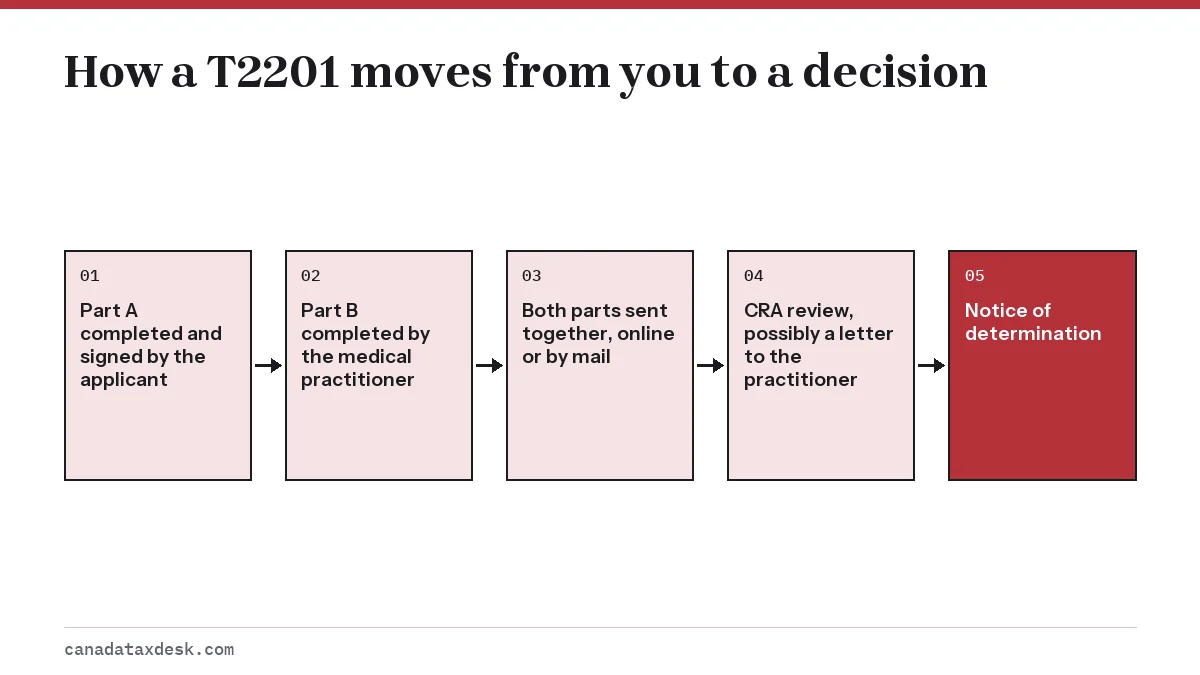
The T2201 form, Disability Tax Credit Certificate, is the only way to apply for the disability tax credit. You complete and sign Part A; an eligible medical practitioner completes Part B and signs it by hand if it is on paper. Both parts must reach the CRA together, either through the digital application or by mail.
- 01Full form name
- Form T2201, Disability Tax Credit Certificate
- 02Who completes Part A
- The person with the impairment, a parent or guardian, or a legal representative
- 03Who completes Part B
- An eligible medical practitioner
- 04Digital reference number is valid for
- Up to 12 months, usable once
- 05Time a practitioner has to answer a CRA letter
- 60 business days
What is the T2201 form?
Form T2201, Disability Tax Credit Certificate, is the CRA application a person uses to be approved for the disability tax credit (DTC). It combines your own details and consent (Part A) with a medical practitioner's description of how the impairment limits daily activities (Part B). The CRA decides eligibility from this form alone, unless it asks for more.
Filling in the T2201 form is not the same as claiming the credit. The form gets you approved; the credit is then claimed on the tax return, as explained on the disability tax credit overview.
Where do I get the T2201 form PDF?
The T2201 is published on the CRA's forms page for T2201 on canada.ca (CRA, Form T2201). As of October 2026 the current version is still the 2023 edition. The CRA offers an accessible fillable PDF, a standard print PDF, a large-print version and an e-text version.
The CRA says you must download the fillable PDF to your computer and open it with Adobe Acrobat Reader 10 or later. Opening it inside a web browser often shows an error message or a blank page instead of the form.
How do I fill out Part A of the T2201?
Part A is the applicant's part. Have the person's social insurance number (SIN) and current mailing address at hand before you start. It covers four topics.
| Part A topic | What you enter | Common mistake |
|---|---|---|
| Person with the disability | Name, mailing address, date of birth, SIN | Using a nickname that does not match CRA records |
| Supporting family member | Details of a relative who may claim the amount, if any | Leaving it blank when a parent will claim for a child |
| Previous years | Consent for the CRA to adjust earlier returns if you are eligible | Not giving consent, then having to request each year yourself |
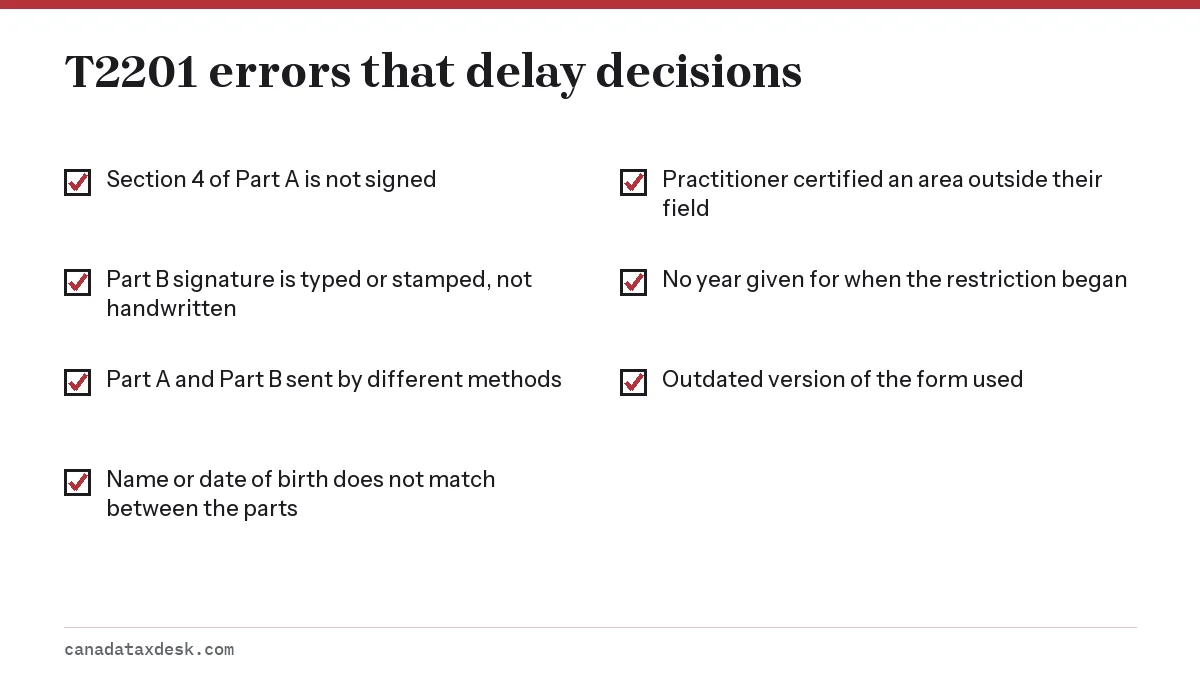
| Authorization (Section 4) | Signature and date; consent for the CRA to contact the practitioner | Unsigned form, which the CRA will not process |
The person with the disability signs Section 4 if they have reached the age of majority in their province. A parent or legal guardian signs for a minor, and an appointed legal representative can sign for an adult. A family member without legal authority cannot sign for an adult, even a spouse.
Should I tick the box to adjust previous years?
In most cases, yes. Consenting in Part A lets the CRA reassess your earlier returns automatically once it confirms which years you qualify for, up to 10 years back. Without it, you would need to request each change yourself after approval.
What does the medical practitioner complete in Part B?
Part B asks the practitioner for their own details, the patient's name and date of birth, and a description of the effects of the impairment in each area that applies. The practitioner bases the answers on symptoms you report and their own direct observation of your limitations.
For each area, the form asks whether you are markedly restricted, the year the restriction began, and whether it has lasted or is expected to last 12 continuous months. It ends with a certification section on the last page. On a paper form, the CRA cannot process Part B unless that signature is handwritten.
Which T2201 form medical practitioner can sign?
Medical doctors and nurse practitioners can certify every area. Optometrists (vision), audiologists (hearing), speech-language pathologists (speaking), psychologists (mental functions), physiotherapists (walking) and occupational therapists (walking, feeding, dressing and cumulative effect) can sign only for their own areas. The full breakdown is on our DTC eligibility guide.
Helping your practitioner answer accurately
Practitioners see you for short visits. Before the appointment, write down a typical day: how long dressing, walking a block or preparing a meal takes you, what help you need, and how many days a week this happens. Bring that note; do not ask the practitioner to overstate anything.
Can I send the T2201 form online?
Yes. The digital application splits the form in two. You submit Part A in your CRA account (Benefits and credits, then Apply for DTC) and receive a reference number. Your practitioner enters that number, with your last name and date of birth, into the CRA's digital form for medical practitioners and submits Part B directly.
- The reference number is valid for up to 12 months and can be used only once.
- The last name and date of birth the practitioner enters must match Part A exactly.
- Both parts must use the same method. A digital Part A cannot be matched with a paper Part B.
- The CRA does not accept DTC forms uploaded through the Submit documents service in your CRA account.
The digital route suits practitioners who use the CRA's portal. If yours prefers paper, use the paper form for both parts. Registration help for the CRA account is on our CRA My Account guide.
Where do I mail a paper T2201?
Mail the completed form, Part A and Part B together, to one of the three tax centres the CRA lists for DTC applications: Jonquière (Quebec), Sudbury (Ontario) or Winnipeg (Manitoba). The CRA's how-to-apply page shows which centre serves your province and the full address (CRA, How to apply for the DTC).
Send the T2201 on its own, to the address on that page, rather than tucking it inside a paper return or another letter to the CRA. The CRA treats an application as complete only when Part A and Part B arrive together, so check that every page of both parts is in the envelope.
Either you or the practitioner can mail it. Keep a full photocopy of both parts before it goes in the envelope, since the CRA does not return the original.
Does my doctor charge to fill out the T2201?
Some do, and the amount is set by the practitioner or clinic, so ask when you book. The CRA states that you are responsible for paying any fee the practitioner charges.
That fee can be claimed as an eligible medical expense on your return. See the medical expenses tax credit page for the 3% of net income threshold.
T2201 errors that delay a decision
The CRA says a decision can take longer if information is missing. These are the problems worth checking before the form leaves your hands.
What happens after you submit the T2201?
The CRA considers an application complete only when it has both Part A and Part B. It may write to your practitioner for more information, and the practitioner has 60 business days to reply. Once your complete application is received, you can follow it with the progress tracker in your CRA account.
If the CRA's letter reaches your practitioner, ask them to answer it rather than set it aside. The letter usually asks for specifics, such as how long an activity takes or how often symptoms occur, and a missed 60-business-day window leaves the CRA deciding on what it already has.
The decision arrives as a notice of determination listing the years you are eligible, or explaining a refusal. Current targets and delay causes are on how long the CRA takes to process the DTC; what the approval is worth is on the disability tax credit amount page.
Step by step
Download or start the form
Download the current T2201 fillable PDF from canada.ca, or start the digital application in your CRA account under Benefits and credits.
Complete Part A
Enter the person's details, any supporting family member, your choice on adjusting previous years, and sign Section 4.
Book the practitioner
Choose a practitioner allowed to certify your area of impairment and give them the form or your reference number.
Practitioner completes Part B
The practitioner describes the effects of the impairment and signs the certification by hand on paper, or submits Part B digitally.
Send it to the CRA
Mail both parts together to the Jonquière, Sudbury or Winnipeg tax centre, or let the digital submission complete the application.
Common questions
Can I fill out Part B of the T2201 myself?
No. Only an eligible medical practitioner can complete and certify Part B. The CRA will not accept a Part B completed by the applicant or a family member.
Why won't the T2201 PDF open?
The fillable PDF has to be saved to your computer and opened in Adobe Acrobat Reader 10 or later. Browsers' built-in PDF viewers often show an error instead of the form.
Is there a 2026 version of the disability tax credit form?
No. As of October 2026 the CRA's T2201 page still offers the 2023 edition, as an accessible fillable PDF, a standard print PDF, a large-print version and an e-text version. Download a fresh copy from canada.ca each time rather than reusing an older saved file.
Can my doctor sign the T2201 electronically?
On the paper form, no; the CRA requires a handwritten signature in the certification section. A practitioner who wants to work electronically uses the CRA's digital application with your reference number instead.
Do I need a new T2201 every year?
Only if your notice of determination shows an end date or the CRA asks for one. Approvals without an expiry carry forward to later years.
What if my reference number expired before my doctor used it?
The reference number lasts up to 12 months. If it expires, submit Part A again in your CRA account to get a new number for your practitioner.
Sources
- Form T2201, Disability Tax Credit Certificate canada.ca
- How to apply for the disability tax credit canada.ca
- CRA's review: Disability tax credit canada.ca
- Guide RC4064, Disability-Related Information 2025 canada.ca
We check figures against these official pages. Rules change; confirm anything that affects a deadline or payment with the agency before you act.
Tell us what happened
Describe your situation and our editors will use it to improve this guide. If you leave your email, we may reply with a pointer to the right page or official contact. We never share your details.