
GST NETFILE: filing your GST/HST return online, screen by screen
Short answer
GST NETFILE (officially GST/HST NETFILE) is the CRA's free online form for filing a GST/HST return without signing in to a CRA account: you enter your 15-character GST/HST account number, the reporting period dates and your 4-digit access code, type in the return amounts, and receive a confirmation number once the return is accepted. Payment is made separately.
- 01What you log in with
- GST/HST account number plus 4-digit access code
- 02Inactivity time-out
- 35 minutes
- 03Proof of filing
- Confirmation number shown on screen
- 04Cannot be used for
- Elections, unlisted rebates, Revenu Quebec accounts
- 05CRA refund target for e-filed returns
- 4 weeks (95% service standard)
What is GST NETFILE?
GST NETFILE is a web form on canada.ca that sends a GST/HST return straight to the Canada Revenue Agency (CRA). The official name is GST/HST NETFILE, and it is the same form whether your business charges 5% GST in Alberta or 13% to 15% HST in Ontario and the Atlantic provinces. There is no separate HST NETFILE service.
The form is built for registrants who do not want to, or cannot, sign in to a CRA business account. Instead of a user ID and password, the "GST NETFILE login" is simply your account number, the period you are reporting and a 4-digit access code the CRA mailed to you (CRA, File a GST/HST return using the online GST/HST NETFILE form).
Who can use GST/HST NETFILE, and who cannot
Most GST/HST registrants can file a regular return with GST/HST NETFILE, including sole proprietors, partnerships and corporations. Non-resident registrants can use it too, but the CRA requires either a Social Insurance Number or an authorized representative in Canada.
The form will not work for you in these situations:
- You do not have your 4-digit GST/HST access code.
- You need to file an election (for example, an election form that must be sent with or instead of a return).
- You want to claim a rebate the NETFILE form does not accept. The CRA lists Forms GST189, GST66, GST190 and GST106 as the ones it takes.
- Your GST account is administered by Revenu Quebec, which is the case for most businesses physically located in Quebec.
If one of those applies, file through your CRA account (My Business Account), have a representative file through Represent a Client, or use another method listed in our guide to filing a GST return.
What you need before you start a GST NETFILE session
Gather everything first. The form times out after 35 minutes without activity, and anything you have typed is lost, so working from a finished worksheet is the safest approach.
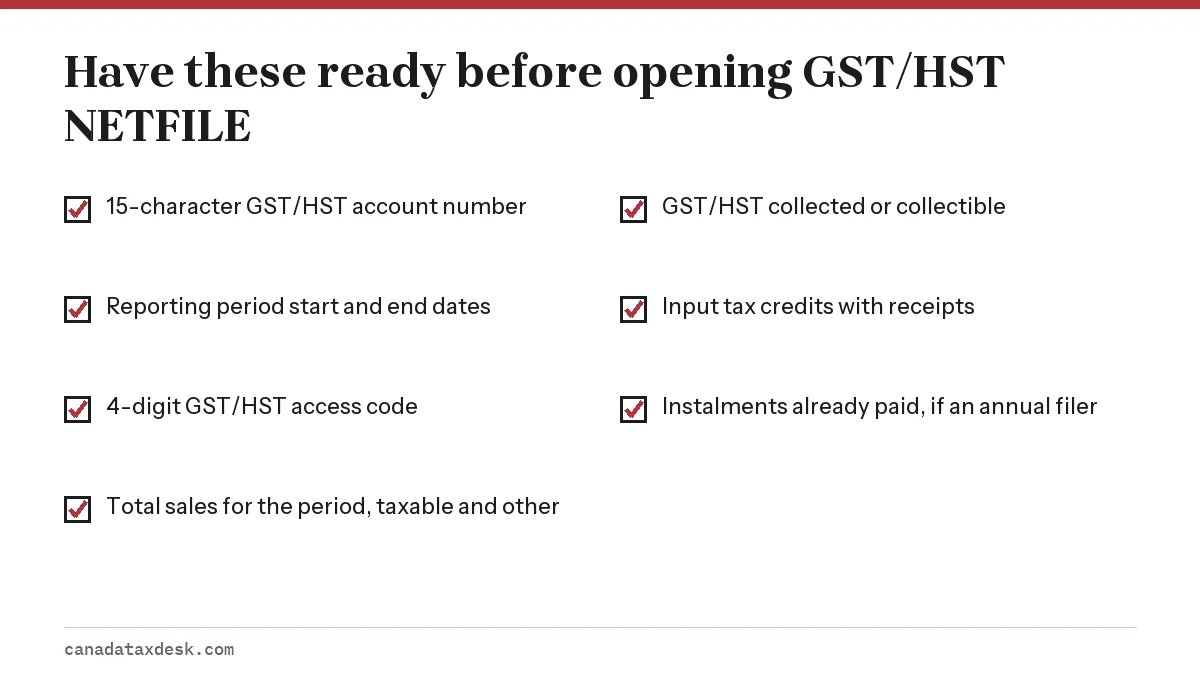
Where to find each item
| Item | Where it comes from |
|---|---|
| GST/HST account number | Your registration confirmation: 9-digit Business Number, then RT and 4 digits (for example 123456789RT0001) |
| Reporting period start and end dates | The filing information package or your CRA account; they must match the CRA's records exactly |
| 4-digit access code | Mailed in your filing package, or viewable in your CRA business account |
| Sales and GST/HST collected | Your sales journal or accounting software totals for the period |
| Input tax credits | Receipts for GST/HST paid on business purchases in the period |
| Instalments paid (annual filers) | Your payment records or CRA account statement |
Lost the code? Our page on the GST/HST access code explains how to view it online or ask for a new one. Getting it can take time, so sort it out well before your due date.
How do I file my GST return with NETFILE? Step by step
Filing through GST/HST NETFILE follows the same sequence every period. The whole session usually takes a few minutes once your numbers are ready.
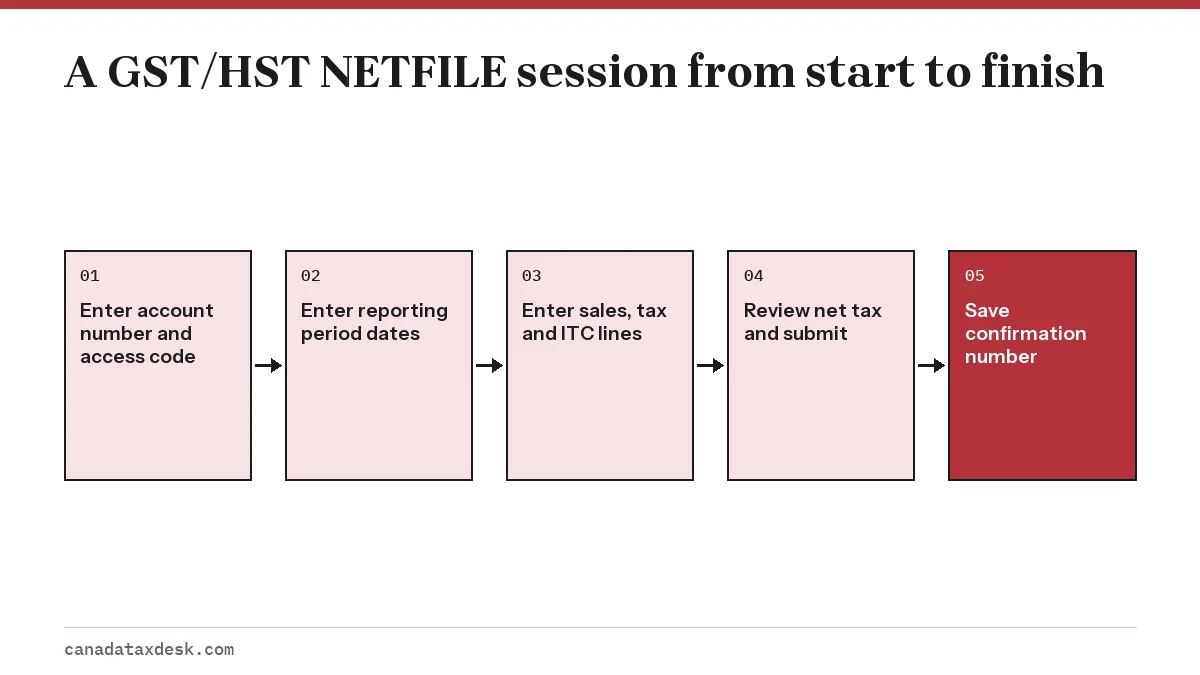
- Open the GST/HST NETFILE form from canada.ca/gst-hst-netfile. Read and accept the terms of use.
- Enter your GST/HST account number, the reporting period "from" and "to" dates, and your 4-digit access code. If any of the four does not match the CRA's file, the form stops you here.
- Answer the set-up questions: whether this is a nil return (no sales, no tax, no credits), whether you want email notifications, and whether you are attaching a rebate or schedule.
- Choose whether to report your sales in detail. If you do, enter taxable sales made in Canada on line 90 and exempt sales, zero-rated exports and other revenue on line 91; line 101 then fills itself in.
- Enter GST/HST collected or collectible on line 103, any additions on line 104, your input tax credits on line 106 and any deductions on line 107. Lines 105, 108 and 109 are calculated for you.
- Annual filers enter instalments already paid on line 110. Enter any rebate you are applying against the balance on line 111.
- Review the summary screen. Compare line 109 (net tax) with your working copy before going further.
- Tick the certification box and submit. Write down or print the confirmation number the form displays.
Filing an HST NETFILE return
In Ontario, Nova Scotia, New Brunswick, Newfoundland and Labrador and Prince Edward Island, you enter HST collected on line 103 exactly as a GST-only business enters GST. The form does not ask you to split the federal and provincial parts. If you brought goods into a harmonized province from a GST-only province and owe the provincial part yourself, that self-assessed amount goes on line 405.
How do I get a confirmation number, and what does it prove?
A confirmation number appears on screen the moment the CRA accepts your return for processing (CRA, GST/HST NETFILE). No email or letter follows, so print the page or save the number with your records for the period.
The number shows the return arrived on that date, which matters if you later need to prove you filed on time. It does not mean the CRA has reviewed or agreed with your figures; the return can still be adjusted after processing, and you would get a notice of assessment explaining any change.
What if no confirmation number appears?
- The session timed out or your connection dropped: start again from the first screen, because nothing was sent.
- An error message names a field: correct it and resubmit. Mismatched period dates are the most common cause.
- You are unsure whether it went through: check the return's status in your CRA business account, or wait a few days and look for it there, before filing a second time, so you do not send two returns for the same period.
Paying the balance after you file with GST NETFILE
Submitting the NETFILE form does not move any money. If line 109, less any instalments and rebates, leaves an amount owing, you pay it separately by the same due date as the return.
| Method | How it works |
|---|---|
| Online or telephone banking | Add the CRA GST/HST payee at your Canadian bank and use your 15-character account number as the reference |
| CRA My Payment | Pay by debit on the CRA website |
| Pre-authorized debit | Set up in My Business Account to pull the payment on a chosen date |
| At a financial institution | Pay in person using a remittance voucher |
| Third-party payment provider | Pay by credit card or other options through a provider, which charges its own fee |
Monthly and quarterly filers must file and pay within one month after the period ends. Individuals with business income and a December 31 year end file by June 15 but pay by April 30. The full set of dates is on our GST/HST filing deadlines page.
Worked example: a quarter that ends on a weekend
A quarterly filer's July 1 to September 30, 2026 period is due October 31, 2026, which is a Saturday. Because the CRA moves weekend due dates to the next business day, both the NETFILE return and the payment are on time if received by Monday, November 2, 2026.
Refunds and nil periods filed through NETFILE
When your input tax credits exceed the tax you collected, the NETFILE return shows a refund. The CRA aims to process 95% of electronically filed GST/HST returns within four weeks, compared with eight weeks for paper returns (CRA guide RC4022). Refunds go by direct deposit if you have set up banking details for the business account.
A period with no sales, no tax collected and no credits still needs a return. NETFILE has a nil return option for this, and our page on filing a nil GST return covers when a period truly qualifies as nil.
Annual filers whose net tax reaches $3,000 or more should also check whether they owe quarterly instalments, explained on our GST/HST instalments page. For the wider picture of registering, charging and paying, start at our GST/HST small business hub.
Step by step
Prepare your figures
Total your sales, GST/HST collected and input tax credits for the period, and fill in the CRA working copy.
Open the form
Go to canada.ca/gst-hst-netfile and accept the terms of use.
Identify yourself
Enter your GST/HST account number, reporting period dates and 4-digit access code.
Enter the return
Answer the set-up questions, then enter sales on lines 90 and 91, tax on line 103, adjustments on 104 and 107, ITCs on 106 and instalments on 110.
Submit
Review line 109, tick the certification box and submit.
Save proof and pay
Record the confirmation number and pay any balance by the due date.
Common questions
Is GST NETFILE free?
Yes. The GST/HST NETFILE form on canada.ca costs nothing to use. Fees only arise if you pay the balance by credit card through a third-party payment provider.
Can I file an HST return with GST NETFILE?
Yes. GST/HST NETFILE handles returns for every province, including the five HST provinces. You report HST collected on the same line a GST-only business uses.
Do I need a CRA account to use GST/HST NETFILE?
No. NETFILE only needs your GST/HST account number, reporting period dates and 4-digit access code. If you do have a CRA business account, filing from inside it skips the access code.
Why does GST NETFILE say my reporting period is invalid?
The dates you entered do not match the period the CRA has on file for your account. Check the dates on your filing information package or in your CRA business account, especially if you recently changed from annual to quarterly filing.
Can I amend a GST/HST return I filed through NETFILE?
Do not send a second NETFILE return for the same period to fix a mistake. Ask the CRA to adjust the filed return, most easily from the GST/HST section of your CRA business account, or in writing if you have no account.
How long does GST NETFILE stay open?
The form signs you out after 35 minutes without activity. Prepare your figures before you start so you are not typing from scattered receipts.
Sources
- File a GST/HST return using the online GST/HST NETFILE form canada.ca
- How to file a GST/HST return canada.ca
- RC4022 General Information for GST/HST Registrants canada.ca
- GST/HST reporting requirements and deadlines canada.ca
We check figures against these official pages. Rules change; confirm anything that affects a deadline or payment with the agency before you act.
Tell us what happened
Describe your situation and our editors will use it to improve this guide. If you leave your email, we may reply with a pointer to the right page or official contact. We never share your details.
Related guides
 GST/HST for Small Business: Register, Charge, File and Pay
A Canadian small business must register for GST/HST once its taxable sales pass $30,000 in one calendar quarter or over four cons…
GST/HST Access Code: Find It Online or Get a New One
You can find your GST/HST access code online: sign in to your CRA business account, open your GST/HST (RT) account and select Vie…
How to File a Nil GST/HST Return Online, Step by Step
To file a nil GST return, sign in to My Business Account and file the return for that period with zero amounts, or use the GST/HS…
GST NETFILE Deadline: GST/HST Due Dates by Filing Period
The GST NETFILE deadline is one month after the end of the reporting period for monthly and quarterly filers, and three months af…
How to File a GST Return in Canada: Lines and Steps
To file a GST return in Canada, total your sales and the GST/HST you charged for the period, subtract the GST/HST you paid on bus…