
GST return: how to file it in Canada, line by line
Short answer
To file a GST return in Canada, total your sales and the GST/HST you charged for the period, subtract the GST/HST you paid on business purchases (input tax credits), and submit the result electronically on lines 101 to 115 of the GST/HST return by the due date. Line 109 is your net tax; a positive balance is paid to the CRA and a negative one is refunded.
- 01Net tax formula
- Line 105 minus line 108 = line 109
- 02Electronic filing required
- Reporting periods beginning in 2024 onward (most registrants)
- 03Time limit to claim most ITCs
- About 4 years
- 04Keep records for
- 6 years from the end of the year they relate to
- 05Payments of $10,000 or more
- Must be made electronically
How do I file a GST return in Canada?
Filing a GST return comes down to five stages: close off your books for the reporting period, work out GST/HST collected, work out input tax credits, enter the figures through an electronic filing method, and pay or receive the difference. The same return (the CRA calls it the GST/HST return) is used whether you charge 5% GST or 13% to 15% HST.
A GST return is due for every reporting period you are registered for, even one with no sales. Most registrants have filed electronically since reporting periods beginning in 2024; only most charities and selected listed financial institutions may still mail a paper return (CRA guide RC4022).
In Ontario, Nova Scotia, New Brunswick, Newfoundland and Labrador and Prince Edward Island, the same form is usually called the HST return. You file an HST return exactly as this page describes: the HST you charged (13% in Ontario) goes on line 103, the HST you paid on business purchases goes on line 106, and the same electronic methods and due dates apply. Our HST rates by province table shows the rate for each province.
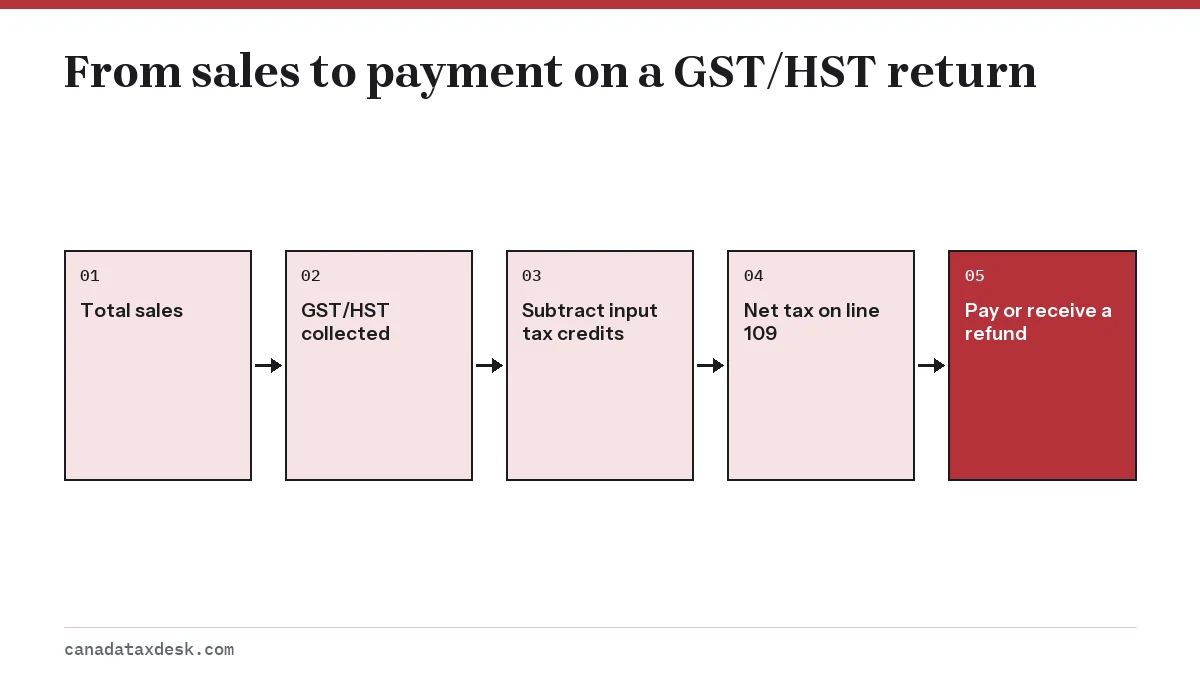
How do I file GST returns online in Canada?
You can file a GST return online in five ways. They all produce the same return; the difference is how you sign in and whether you need the 4-digit access code.
| Method | Sign-in | Limits |
|---|---|---|
| CRA business account (My Business Account) | CRA user ID or sign-in partner | Fewest restrictions; no access code |
| GST/HST NETFILE form | Account number and access code | No elections or unlisted rebates |
| Certified accounting software (Internet file transfer) | Access code | No schedules or elections |
| Participating financial institution (EDI) | Your bank | No certain rebates; pay at the same time |
| GST/HST TELEFILE by phone | Access code | No payments or schedules |
Sole proprietors who file once a year often find the CRA account easiest, since due dates and balances sit on the same screen. If you prefer not to create an account, our GST NETFILE guide walks through the online form.
What lines are on the GST/HST return?
The GST/HST return has about a dozen lines that matter to a typical small business. Electronic methods calculate the totals (lines 105, 108, 109, 114 and 115) for you, so your job is to supply the inputs accurately.
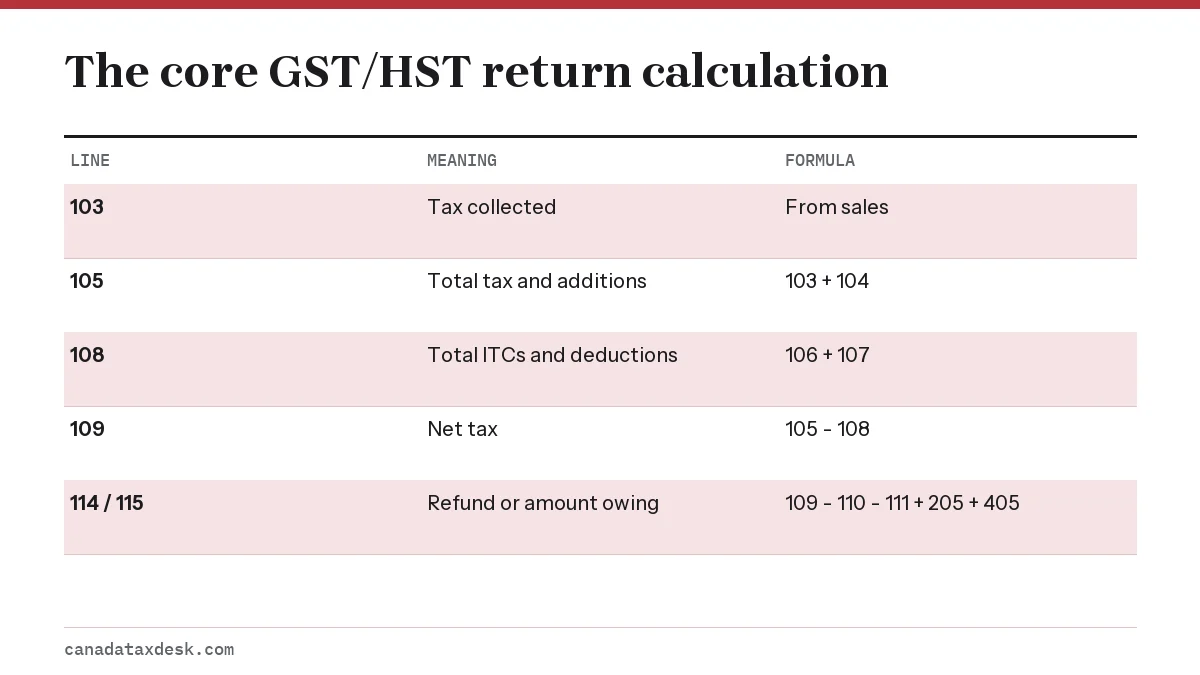
| Line | Name | What goes on it |
|---|---|---|
| 90 and 91 (online) | Sales detail | 90: taxable sales in Canada, including zero-rated. 91: exempt sales, zero-rated exports and other revenue |
| 101 | Sales and other revenue | Total revenue for the period, excluding GST/HST and PST; filled in from 90 and 91 online |
| 103 | GST/HST collected or collectible | All tax you charged or should have charged, on paid and unpaid invoices |
| 104 | Adjustments to be added | Items that raise net tax, such as tax recovered on a bad debt you had written off |
| 106 | GST/HST paid or payable (ITCs) | Tax paid on purchases used in your commercial activities |
| 107 | Adjustments to be deducted | Items that lower net tax, such as tax on a bad debt written off |
| 109 | Net tax | Line 105 (103 plus 104) minus line 108 (106 plus 107) |
| 110 | Instalments and other annual filer payments | Quarterly instalments, or an April 30 payment already made |
| 111 | Rebates | Rebates you choose to apply against the balance |
| 205 and 405 | Self-assessed tax | Tax on certain real property purchases, imports and goods brought into an HST province |
| 114 or 115 | Refund claimed or amount owing | The final result after credits and self-assessed tax |
Why line 101 matters even though no tax is calculated on it
Line 101 does not change what you owe, but the CRA uses it to decide your filing frequency. Reporting sales correctly on lines 90 and 91 keeps you on the right reporting period, which is annual for most businesses with $1.5 million or less in taxable supplies.
The quick method uses different figures
If you elected the quick method, line 101 holds tax-included taxable sales and line 103 is a set percentage of them, rather than tax collected minus credits. Our quick method page explains the percentages and when the election pays off.
Worked example: a quarterly GST return for a BC business
A landscaping company in British Columbia files quarterly and charges 5% GST (plus BC PST, which is not reported here). For April 1 to June 30, 2026 it billed $62,000 before tax, all taxable and all in Canada. It bought a mower for $4,000 and fuel and supplies for $6,000, paying 5% GST on both.
| Line | Calculation | Amount |
|---|---|---|
| 90 / 101 | Taxable sales before tax | $62,000 |
| 103 | $62,000 x 5% | $3,100 |
| 106 | GST on $10,000 of purchases | $500 |
| 109 | $3,100 minus $500 | $2,600 |
| 115 | No instalments or rebates | $2,600 owing |
The return and the $2,600 payment were due July 31, 2026. Had the company bought a $60,000 compact loader that quarter instead of the mower, its ITC of $3,000 plus $300 for supplies would exceed the $3,100 collected, and line 114 would show a $200 refund.
What are input tax credits and how do you claim them?
Input tax credits (ITCs) are the GST/HST you paid or owe on purchases used in your commercial activities, claimed on line 106 to reduce the tax you remit. Only registrants can claim them, and only for the business-use share of each purchase.
The CRA can deny an ITC if your receipt lacks required details. What the document must show rises with the size of the purchase (CRA guide RC4022):
| Purchase total | Receipt must show |
|---|---|
| Under $100 | Supplier's name, date, total paid |
| $100 to $499.99 | Also the GST/HST amount or a tax-included statement, and the supplier's GST/HST number |
| $500 or more | Also your name, a description of the goods or services, and the payment terms |
- Missed an ITC? You can generally claim it on a later return, up to the due date of the return for the last period ending within four years after the period in which you could first have claimed it.
- Not sure a supplier is registered? Check its number in the CRA's GST/HST Registry before claiming a large credit.
- Mixed personal and business use, such as a vehicle or home office, needs an apportioned claim, not the full tax.
How do I pay GST owing, or get a refund?
Pay GST owing by the return's due date through online banking, the CRA's My Payment service, a pre-authorized debit set up in your CRA business account, or at your financial institution with a remittance voucher. Payments of $10,000 or more must be made electronically.
Monthly and quarterly filers pay within one month after the period ends. Annual filers who must make quarterly instalments enter those instalments on line 110 so they are not charged twice. Our GST/HST filing deadlines page lists every due date by frequency, and the instalments page covers who has to prepay.
When a refund arrives
The CRA aims to process 95% of electronically filed GST/HST returns within four weeks. It will hold a refund if you have other required returns outstanding, including a sole proprietor's personal income tax return, so file everything before expecting the money. A refund of $2 or less after interest and penalties is not paid out but is applied to other debts.
Keeping records for your GST/HST return
Keep all sales invoices, purchase receipts and records that support your GST/HST return for six years from the end of the year they relate to. You need written CRA permission to destroy them sooner, and the CRA can ask you to keep them longer.
- A sales journal that separates taxable, zero-rated and exempt sales.
- Copies of every invoice you issued, showing your GST/HST number.
- Purchase receipts meeting the ITC detail rules above.
- A printed GST/HST working copy or summary of each return filed and its confirmation number.
- Records of instalments and payments made.
Tidy records turn the next return into a copy-and-total job. For the full cycle from registration to payment, see our GST/HST small business hub.
Step by step
Close the period
Total your sales, GST/HST collected and GST/HST paid on purchases for the reporting period.
Choose a method
File through your CRA business account, GST/HST NETFILE, certified software or your bank.
Enter sales and tax
Report sales on lines 90 and 91 and tax collected on line 103, plus any line 104 adjustments.
Enter credits
Report input tax credits on line 106, deductions on line 107, instalments on 110 and rebates on 111.
Submit and pay
Check net tax on line 109, submit, keep the confirmation number and pay any balance by the due date.
Common questions
Can I file a GST return myself without an accountant?
Yes. Most small businesses with straightforward sales can file their own GST/HST return online in a few minutes once their books are totalled. Complex situations such as real property sales or imports may justify professional help.
How do I file an HST return in Ontario?
The same way as a GST return. File the GST/HST return electronically, usually through your CRA business account or GST/HST NETFILE, report the 13% HST you charged on line 103 and the HST paid on business purchases on line 106, then pay any balance by the due date for your reporting period.
Can I still mail a paper GST return?
Only most charities and selected listed financial institutions are exempt from electronic filing. Other registrants who mail a paper GST/HST return can be charged a failure-to-file-electronically penalty, even if the return is on time.
Do I include PST on my GST return?
No. Provincial sales tax in British Columbia, Saskatchewan and Manitoba and Quebec sales tax are reported to their own provincial authorities. Leave PST out of line 101 and line 103.
What if I made a mistake on a GST return I already filed?
Ask the CRA to adjust the return for that period rather than filing a second one. Small corrections to ITCs you forgot can often be claimed on a later return within the time limit instead.
Can I claim ITCs for purchases made before I registered?
Partly. New registrants can claim ITCs on inventory and capital property on hand at registration and on prepaid rent or services for periods after registration, but not on services used before registration.
Is a GST return due if I made no sales?
Yes. A return is required for every reporting period, even with no activity, and you file it as a nil return.
Sources
- How to file a GST/HST return canada.ca
- RC4022 General Information for GST/HST Registrants canada.ca
- File a GST/HST return using the online GST/HST NETFILE form canada.ca
- GST/HST reporting requirements and deadlines canada.ca
We check figures against these official pages. Rules change; confirm anything that affects a deadline or payment with the agency before you act.
Tell us what happened
Describe your situation and our editors will use it to improve this guide. If you leave your email, we may reply with a pointer to the right page or official contact. We never share your details.
Related guides
 GST/HST for Small Business: Register, Charge, File and Pay
A Canadian small business must register for GST/HST once its taxable sales pass $30,000 in one calendar quarter or over four cons…
GST NETFILE: How to File Your GST/HST Return Online
GST NETFILE (officially GST/HST NETFILE) is the CRA's free online form for filing a GST/HST return without signing in to a CRA ac…
GST Quick Method: Rates, Eligibility and Worked Example
The GST quick method lets an eligible small business remit a fixed percentage of its tax-included sales instead of tracking input…
GST NETFILE Deadline: GST/HST Due Dates by Filing Period
The GST NETFILE deadline is one month after the end of the reporting period for monthly and quarterly filers, and three months af…
GST Instalments (CRA): Due Dates, $3,000 Rule and Amounts
GST instalments are due one month after the end of each fiscal quarter, so a December 31 year end means April 30, July 31, Octobe…